




Key Takeaways
Compare top touchscreen kiosk software platforms for interactive displays. Comprehensive evaluation of features, deployment options, pricing models, and vendor capabilities. Expert decision framework with weighted criteria to select winning solutions for schools, organizations, and public spaces.
Why Touchscreen Kiosk Software Selection Matters More Than Hardware
The interactive display hardware market has commoditized substantially over the past five years. Commercial-grade touchscreen displays from reputable manufacturers deliver consistent quality at competitive prices, with 43-inch to 55-inch interactive displays available from $800-$2,500 and larger format options scaling predictably. Hardware specifications have converged around reliable capacitive or infrared touch technologies, adequate processing power, and durable commercial ratings.
Software diverges dramatically. The platform powering your touchscreen kiosk determines whether visitors experience responsive, intuitive interactions or encounter frustrating lag, confusing navigation, and limited functionality. According to industry analysis, purpose-built interactive kiosk software delivers fundamentally different user experiences compared to adapted digital signage platforms or web-based slideshow tools.
This software decision shapes:
- Interaction quality affecting whether touch responses feel immediate and natural or sluggish and unpredictable
- Content management efficiency determining whether non-technical staff can update displays independently or require IT assistance
- Feature availability enabling advanced capabilities like search, filtering, multimedia integration, and data collection
- Hardware flexibility allowing organizations to select optimal display hardware without software lock-in constraints
- Deployment scalability supporting single installations through distributed networks managed centrally
- Accessibility compliance ensuring displays serve all visitors including those with disabilities
- Long-term viability reflecting vendor stability, update frequency, and continued platform evolution

Organizations deploying interactive touchscreen solutions should prioritize software evaluation before finalizing hardware selections. The right software platform accommodates various hardware options while delivering consistent professional experiences. The wrong software choice creates frustrations that even premium hardware cannot remedy.
Critical Evaluation Criteria for Interactive Kiosk Software
Establishing weighted evaluation frameworks enables objective comparison across competing platforms. Based on typical institutional requirements for public-facing interactive displays, these criteria prove most decision-critical:
1. Touch Interaction Quality (Weight: 20%)
Touch responsiveness directly impacts user experience and engagement. Professional interactive kiosk software delivers immediate visual feedback, smooth animations, and intuitive gesture support that feels natural to visitors. Poor touch implementation creates frustration that undermines the entire installation purpose.
Key Requirements:
- Touch response latency under 100 milliseconds for immediate feedback
- Visual confirmation of touches through highlighting, animations, or transitions
- Appropriate touch target sizing (minimum 44×44 pixels per accessibility guidelines)
- Multi-touch gesture support for zoom, pan, and natural navigation
- Palm rejection preventing accidental touches
- Smooth scrolling and animations maintaining 60+ frames per second
- Haptic feedback options where hardware supports it
Solutions specifically designed for interactive experiences prioritize touch quality over platforms adapted from passive digital signage purposes. Testing touch responsiveness across various content types reveals substantial differences between purpose-built and adapted platforms.
2. Content Management System Capabilities (Weight: 18%)
Sustainable interactive kiosk deployments require content management systems enabling non-technical staff to update information independently without ongoing developer assistance. CMS efficiency determines whether displays remain current or become stale as update barriers discourage maintenance.
Critical Capabilities:
- Intuitive web-based interfaces accessible from any device and location
- Template-based content creation maintaining visual consistency
- Rich media support for images, videos, PDFs, and interactive elements
- Bulk import functionality for efficiently adding large content collections
- Search and filtering tools helping visitors discover specific information
- Scheduling capabilities for time-sensitive content activation
- Multi-user workflows with content approval processes
- Version control tracking changes and enabling rollbacks if needed
- Preview functionality showing exactly how content will appear

Organizations implementing digital recognition displays particularly benefit from CMS platforms designed specifically for profile-based content rather than generic digital signage tools.
3. Hardware & Platform Flexibility (Weight: 15%)
Software dictating specific hardware requirements creates vendor lock-in situations limiting procurement options, increasing costs, and complicating future expansions or replacements. Platform-independent software provides freedom to select optimal hardware matching installation requirements and budgets.
Flexibility Requirements:
- Cross-platform operation (Windows, Android, ChromeOS, Linux)
- Hardware manufacturer independence without proprietary equipment requirements
- Display size adaptability from tablets through large-format installations
- Touch technology compatibility (capacitive, infrared, optical)
- Resolution scaling maintaining quality across different pixel densities
- Orientation support for portrait, landscape, and rotating displays
- External peripheral integration (printers, scanners, card readers)
- Network connectivity flexibility (ethernet, WiFi, cellular, offline operation)
Web-based kiosk software often provides maximum hardware flexibility because functionality runs in standard browsers rather than requiring platform-specific native applications. This browser-based approach enables deployment across virtually any modern touchscreen device.
4. Deployment & Scalability (Weight: 12%)
Single kiosk installations demand different software capabilities than distributed networks managing dozens or hundreds of displays across multiple locations. Scalability determines whether platforms grow with organizational needs or require migration to different solutions as deployments expand.
Scalability Factors:
- Centralized management controlling all displays from unified dashboards
- Grouped device management targeting content to specific locations or categories
- Remote monitoring showing device status, connectivity, and error conditions
- Automatic software updates deploying improvements without individual device access
- Content synchronization ensuring consistency across all installations
- Performance maintenance as device counts increase
- Licensing models scaling economically without per-device penalties
Solutions like Rocket Alumni Solutions demonstrate how purpose-built platforms scale from single displays through campus-wide networks while maintaining centralized management efficiency.
5. Feature Richness & Interactivity (Weight: 12%)

Interactive kiosks should provide engaging experiences beyond passive content display. Advanced features transform static information into explorable, searchable, and personally relevant experiences that encourage extended engagement.
Advanced Features:
- Robust search functionality enabling quick discovery of specific content
- Dynamic filtering by categories, dates, achievements, or custom attributes
- Multimedia integration incorporating photos, videos, audio, and documents
- Social sharing allowing visitors to send content to personal devices
- QR code generation extending experiences beyond physical displays
- Data collection gathering analytics about usage patterns and popular content
- Personalization adapting content based on visitor selections or profiles
- Multilingual support serving diverse audiences
- Interactive maps and wayfinding for navigation applications
- Form submission for surveys, feedback, or information requests
Organizations deploying interactive kiosk solutions should distinguish between platforms offering genuinely interactive experiences versus glorified slideshows labeled as interactive.
6. Accessibility & ADA Compliance (Weight: 10%)
Federal accessibility requirements under the Americans with Disabilities Act mandate that digital information systems provide equivalent access for users with disabilities. Educational institutions and government entities face particularly strict compliance obligations, but accessibility benefits all organizations by ensuring inclusive experiences.
Accessibility Requirements:
- WCAG 2.1 AA conformance for digital content presentation
- Screen reader compatibility enabling visually impaired access
- Keyboard navigation alternatives to touch-only interfaces
- Sufficient color contrast ratios (minimum 4.5:1 for text, 3:1 for interface elements)
- Text resizing without loss of functionality
- Alternative text for all meaningful images
- Captions and transcripts for audio and video content
- Adjustable timeout periods accommodating varied interaction speeds
Accessibility compliance documentation should include VPAT (Voluntary Product Accessibility Template) statements from vendors detailing specific conformance levels achieved.
7. Security & Data Protection (Weight: 8%)
Public-facing kiosks require security architectures protecting both the systems themselves and any data they collect or display. Security failures can expose organizations to liability, data breaches, or malicious exploitation.
Security Considerations:
- Kiosk lockdown preventing access to underlying operating systems
- Automatic session resets returning to home screens after inactivity
- Encrypted data transmission for any information sent across networks
- Secure content management access with role-based permissions
- Audit logging tracking all content changes and administrative actions
- Privacy compliance for any personal information displayed or collected
- Protection against common attack vectors (XSS, SQL injection, etc.)
- Regular security updates addressing newly discovered vulnerabilities
Cloud-based platforms shift security responsibilities partially to vendors but introduce considerations around data residency, vendor access policies, and third-party subprocessor practices.
8. Total Cost of Ownership (Weight: 5%)
Budget realities constrain all technology decisions. Accurate cost comparison requires examining multi-year total ownership expenses rather than initial purchase prices alone, as subscription models, support fees, and hidden costs accumulate differently across platforms.
Cost Components:
- Software licensing (subscription vs. perpetual vs. usage-based)
- Initial setup and implementation services
- Content creation or migration expenses
- Hardware acquisition if not included in solution
- Installation and configuration labor
- Staff training requirements
- Ongoing maintenance and support fees
- Upgrade costs as needs evolve
- Replacement or expansion expenses
Some platforms advertise low initial costs while imposing substantial ongoing fees. Others require higher upfront investment but minimize recurring expenses. Five-year total cost analysis reveals true economic differences.
Detailed Platform Comparison: Leading Solutions
This analysis evaluates representative platforms across the interactive kiosk software spectrum, from purpose-built solutions to adapted digital signage tools:
Rocket Alumni Solutions: Purpose-Built Interactive Recognition Platform
Overview: Rocket Alumni Solutions provides comprehensive touchscreen kiosk software designed specifically for recognition applications including halls of fame, donor walls, achievement displays, and historical timelines across educational, nonprofit, corporate, and community contexts.
Strengths:
- Recognition-optimized features including auto-ranking systems, unlimited inductee capacity, and sophisticated search functionality specifically designed for discovering people, achievements, and stories
- Hybrid architecture combining web-based content management with progressive web app technology delivering native-like performance without platform lock-in
- Accessibility compliance with WCAG 2.1 AA conformance validated through third-party audits
- Hardware flexibility supporting any modern touchscreen regardless of operating system or manufacturer
- Comprehensive implementation support including content migration, hardware recommendations, staff training, and ongoing technical assistance
- Proven reliability demonstrated through 1,000+ installations nationwide with 99%+ uptime
- Unified online and physical experiences enabling web-accessible halls of fame complementing physical kiosks from shared content management
Ideal For:
- Educational institutions (K-12 schools, colleges, universities)
- Athletic departments seeking to honor teams, athletes, and achievements
- Nonprofit organizations highlighting donors, volunteers, and community impact
- Corporate recognition programs celebrating employees, milestones, and company history
- Any organization prioritizing professional recognition experiences with comprehensive support
Pricing: Contact for customized quote based on specific requirements and installation scope
Learn More: Rocket Alumni Solutions
Intuiface: Enterprise Interactive Experience Platform
Overview: Intuiface provides code-free interactive presentation software supporting complex multi-touch experiences, data integrations, and custom interface designs across diverse hardware platforms.
Strengths:
- Maximum design flexibility with no templates limiting creative possibilities
- Extensive integration capabilities connecting to databases, APIs, IoT sensors, and external systems
- Hardware agnostic supporting Windows, Android, iOS, Samsung Tizen, LG webOS, and Chrome OS
- Advanced interactivity including multi-touch gestures, motion detection, and RFID integration
- Offline operation with robust local caching
- Analytics platform providing detailed usage insights
Limitations:
- Complexity requiring expertise making implementation challenging for organizations without dedicated interactive design staff
- Higher cost structure reflecting enterprise positioning
- Steeper learning curve compared to purpose-built platforms with recognition-specific templates
- Generalist platform requiring customization for specific use cases rather than offering purpose-built features
Ideal For:
- Museums and cultural institutions with dedicated experience design teams
- Corporate brands creating custom marketing installations
- Large organizations with technical resources for complex implementations
- Applications requiring sophisticated external system integrations
Pricing: Subscription model starting around $100/month per player, with enterprise pricing for larger deployments

OptiSigns: Digital Signage with Basic Touch Support
Overview: OptiSigns delivers cloud-based digital signage primarily designed for menu boards, announcements, and directional displays, with limited touch interaction capabilities added to passive signage foundations.
Strengths:
- Low initial cost with affordable per-screen monthly pricing
- Simple content scheduling for rotating announcements and information
- Multi-screen management from centralized dashboards
- Cloud-based access requiring no on-premise servers
Limitations:
- Limited interactivity beyond basic button navigation between screens
- No robust search functionality for discovering specific content
- Signage-first design with touch capabilities feeling like afterthoughts
- Minimal content organization lacking sophisticated filtering or categorization
- Basic content management without specialized recognition features
Ideal For:
- Simple directional displays requiring occasional user navigation
- Budget-constrained implementations accepting limited functionality
- Organizations primarily needing passive signage with minimal interactive elements
Pricing: Starting around $10-20 per screen per month
DIY Web-Based Approaches: Google Slides, PowerPoint Web
Overview: Some organizations attempt using free presentation tools like Google Slides or PowerPoint Web App as kiosk software by linking slides and enabling touchscreen navigation.
Strengths:
- Zero software cost for organizations with existing Google or Microsoft accounts
- Familiarity with tools staff already understand
- Quick prototyping for testing concepts before platform investment
Limitations:
- Not designed for kiosks resulting in numerous fundamental problems including exposed interface elements, lack of kiosk lockdown, session persistence issues, and poor touch optimization
- No professional touch experience with laggy responses and awkward navigation
- Accessibility failures lacking screen reader support and keyboard navigation
- No content management requiring manual file editing for updates
- Security vulnerabilities exposing underlying systems to public access
- Minimal analytics providing no usage insights
- Unprofessional appearance undermining institutional credibility
Verdict: Google Slides and PowerPoint Web App fundamental limitations make them unsuitable for any professional, long-term touchscreen kiosk application where user experience, security, management capabilities, or engagement matter. While free, these tools cost organizations in terms of poor visitor experiences, maintenance frustrations, and missed engagement opportunities. Professional kiosk software investments pay for themselves through superior results.
Decision Matrix: Weighted Comparison
This scoring framework evaluates platforms across critical criteria using a 100-point scale where higher scores indicate stronger fit for typical organizational requirements:
| Criteria | Weight | Rocket Alumni | Intuiface | OptiSigns | DIY Tools |
|---|---|---|---|---|---|
| Touch Interaction Quality | 20% | 95 | 90 | 60 | 35 |
| Responsiveness | ✅ Excellent | ✅ Excellent | ⚠️ Basic | ❌ Poor | |
| Visual feedback | ✅ Immediate | ✅ Configurable | ⚠️ Limited | ❌ Minimal | |
| Gesture support | ✅ Comprehensive | ✅ Advanced | ❌ Basic | ❌ None | |
| Touch target sizing | ✅ Optimized | ⚠️ Manual setup | ⚠️ Variable | ❌ Not optimized | |
| Content Management | 18% | 95 | 70 | 65 | 25 |
| Ease of use | ✅ Intuitive | ⚠️ Complex | ✅ Simple | ⚠️ Manual | |
| Template systems | ✅ Purpose-built | ⚠️ DIY required | ⚠️ Basic | ❌ None | |
| Bulk operations | ✅ Comprehensive | ⚠️ Limited | ⚠️ Basic | ❌ Manual | |
| Rich media support | ✅ Extensive | ✅ Excellent | ⚠️ Basic | ⚠️ Limited | |
| Hardware Flexibility | 15% | 95 | 90 | 85 | 80 |
| Cross-platform | ✅ Universal | ✅ Broad | ✅ Good | ✅ Browser-based | |
| Hardware independence | ✅ Complete | ✅ Complete | ✅ Complete | ✅ Complete | |
| Display adaptability | ✅ Responsive | ✅ Configurable | ✅ Good | ⚠️ Manual | |
| Deployment & Scalability | 12% | 95 | 85 | 80 | 30 |
| Central management | ✅ Unified | ✅ Advanced | ✅ Cloud-based | ❌ None | |
| Multi-site support | ✅ Optimized | ✅ Robust | ✅ Supported | ❌ Manual | |
| Remote monitoring | ✅ Comprehensive | ✅ Advanced | ⚠️ Basic | ❌ None | |
| Feature Richness | 12% | 95 | 85 | 40 | 30 |
| Search functionality | ✅ Advanced | ⚠️ Custom build | ❌ Minimal | ❌ None | |
| Dynamic filtering | ✅ Sophisticated | ⚠️ Custom build | ❌ Limited | ❌ None | |
| Multimedia integration | ✅ Seamless | ✅ Extensive | ⚠️ Basic | ⚠️ Limited | |
| Accessibility & ADA | 10% | 95 | 75 | 60 | 40 |
| WCAG 2.1 AA compliance | ✅ Certified | ⚠️ Achievable | ⚠️ Partial | ❌ Non-compliant | |
| Screen reader support | ✅ Optimized | ⚠️ Manual setup | ⚠️ Limited | ❌ Poor | |
| Keyboard navigation | ✅ Complete | ⚠️ Configurable | ⚠️ Basic | ❌ Limited | |
| Security & Data Protection | 8% | 90 | 85 | 80 | 50 |
| Kiosk lockdown | ✅ Robust | ✅ Configurable | ✅ Good | ❌ None | |
| Session security | ✅ Automatic | ✅ Advanced | ✅ Basic | ❌ Manual | |
| Data encryption | ✅ Comprehensive | ✅ Comprehensive | ✅ Standard | ⚠️ Depends | |
| Total Cost (5-year) | 5% | 75 | 50 | 90 | 95 |
| Initial investment | ⚠️ Moderate | ⚠️ High | ✅ Low | ✅ Free | |
| Ongoing costs | ⚠️ Subscription | ⚠️ Subscription | ✅ Low | ✅ None | |
| Implementation cost | ✅ Supported | ❌ High | ⚠️ DIY | ⚠️ DIY | |
| WEIGHTED TOTAL | 100% | 92.55 | 80.70 | 63.65 | 36.05 |
Interpretation of Comparison Results
Rocket Alumni Solutions emerges as the strongest overall choice for organizations prioritizing professional recognition experiences with comprehensive support. The platform’s purpose-built features, accessibility compliance, and implementation assistance deliver superior value for educational institutions, nonprofits, and organizations without dedicated interactive design teams.
Intuiface serves specialized needs for organizations with technical resources to create custom interactive experiences requiring sophisticated integrations or unique designs that templates cannot accommodate. Museums, large corporations, and marketing installations justify the complexity and cost investment.
OptiSigns fits limited-interaction scenarios where simple navigation between information screens suffices and budgets constrain software investment. The platform works adequately for directional displays and basic informational kiosks accepting limited engagement capabilities.
DIY approaches using Google Slides or PowerPoint prove inadequate for professional kiosk deployments. While zero cost attracts initial consideration, the poor user experiences, security vulnerabilities, and management frustrations create false economy. Professional kiosk software represents necessary investment for credible public-facing interactive installations.
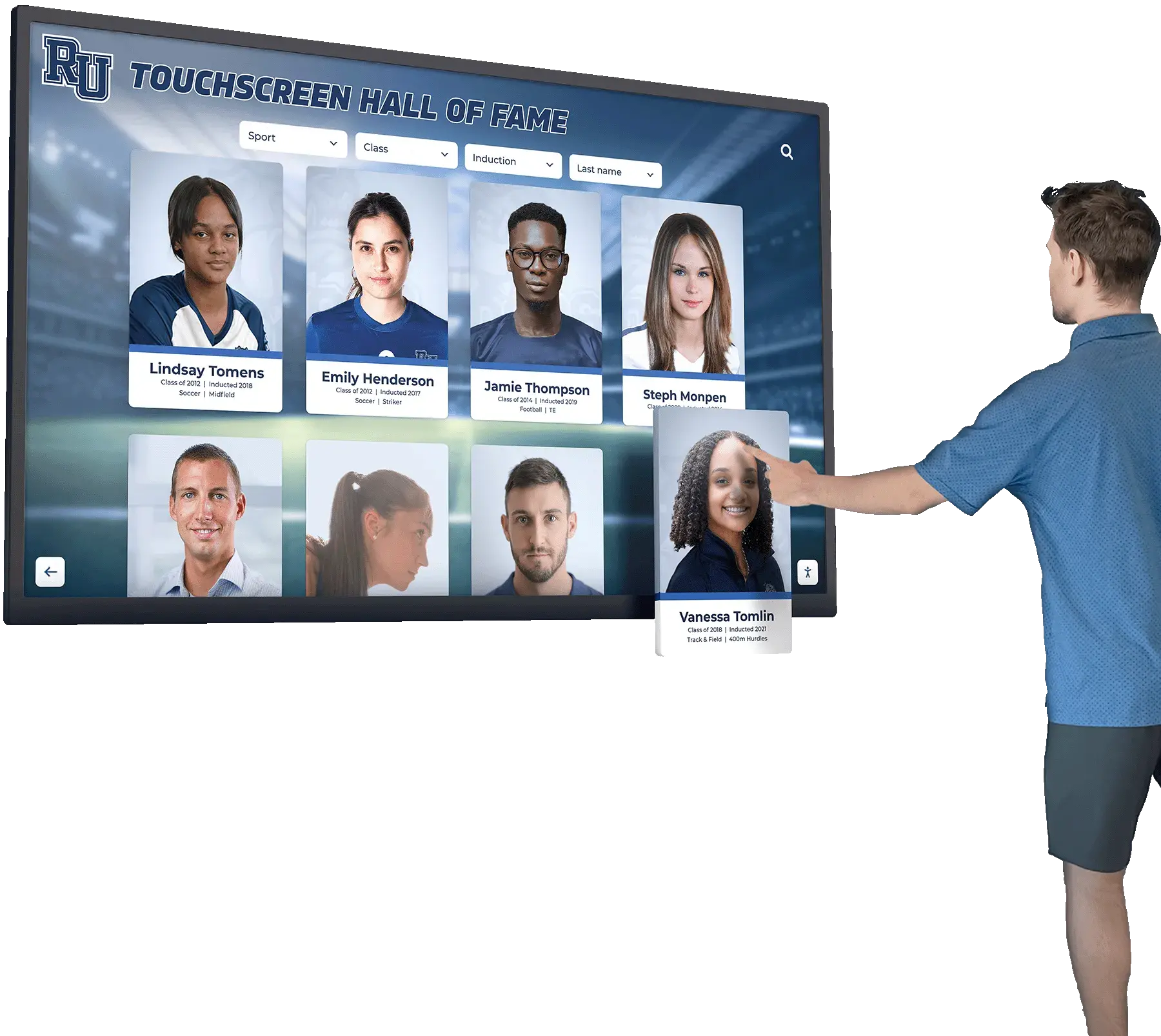
Why Rocket Alumni Solutions Wins for Recognition Applications
After evaluating architectural approaches and specific platforms, examining how Rocket Alumni Solutions implements touchscreen kiosk software specifically for recognition contexts reveals competitive advantages:
Recognition-Specific Feature Set
Unlike generic interactive kiosk platforms requiring extensive customization, Rocket provides purpose-built capabilities designed specifically for honoring achievements, individuals, and organizational history:
- Auto-ranking systems dynamically organizing honorees by statistical achievement, date, category, or custom criteria
- Unlimited inductee capacity supporting programs that grow indefinitely without performance degradation or additional fees
- Sophisticated search functionality enabling visitors to discover specific people, years, sports, departments, or achievement types instantly
- Rich biographical profiles incorporating photos, videos, statistics, narratives, and achievement documentation
- Historical timelines connecting recognition to organizational evolution and context
- QR code integration allowing visitors to access detailed profiles on personal devices, extending engagement beyond physical displays
Organizations implementing interactive touchscreen recognition systems discover that purpose-built platforms require minimal configuration compared to adapting generic tools for recognition purposes.
Hybrid Architecture Combining Best Attributes
Rocket deploys web-based architecture for content management while optimizing frontend performance through progressive web app technology. This hybrid approach delivers:
- Cloud-based CMS enabling instant remote updates from any device and location
- Offline operation capability through local content caching ensuring displays continue functioning during network disruptions
- Universal hardware compatibility supporting deployment on any modern touchscreen regardless of operating system
- Native-like responsiveness matching dedicated app performance through optimization techniques
- Responsive design automatically adapting to different screen sizes and orientations
This architecture provides flexibility and ease-of-management advantages of web-based platforms without sacrificing the performance characteristics organizations expect from professional interactive installations.
WCAG 2.1 AA Accessibility Compliance
Accessibility compliance distinguishes professionally engineered platforms from adapted digital signage tools. Rocket implements accessibility comprehensively:
- Third-party accessibility audits validating WCAG 2.1 AA conformance rather than self-certification
- Screen reader optimization ensuring complete content accessibility for visually impaired visitors
- Keyboard navigation providing touch alternatives for users with motor disabilities
- Color contrast compliance meeting minimum ratio requirements throughout all interfaces
- Responsive text scaling maintaining functionality at enlarged sizes
Educational institutions, government entities, and organizations committed to inclusive experiences require documented accessibility compliance that specialized recognition software provides.
Comprehensive Implementation Support
Technical capabilities matter less if organizations struggle with implementation. Rocket provides end-to-end assistance bridging the gap between software capabilities and successful deployments:
- Content migration services digitizing historical achievements from physical plaques, yearbooks, and archives
- Recognition program consulting helping institutions establish selection criteria, categories, and organizational frameworks
- Hardware recommendations matching display specifications to installation environments, traffic patterns, and budgets without proprietary equipment requirements
- Staff training programs ensuring content managers operate systems confidently and independently
- Ongoing technical support resolving issues rapidly through responsive assistance rather than leaving organizations stranded
Organizations deploying digital hall of fame touchscreen solutions benefit from vendors treating software as part of comprehensive recognition program partnerships rather than standalone product transactions.
Proven Reliability and Vendor Stability
With over 1,000 installations across educational institutions nationwide, Rocket demonstrates operational stability and vendor viability that startups cannot match:
- 99%+ uptime supporting mission-critical recognition during major events, reunions, and public occasions
- Commercial-grade hardware partnerships with manufacturers rated for continuous 24/7 operation
- Regular platform updates continuously improving functionality based on institutional feedback
- Long-term vendor stability ensuring continued support throughout decade-long recognition display lifecycles
- Established implementation processes refined through hundreds of successful deployments
Recognition displays represent long-term institutional commitments. Vendor reliability proves as critical as technical capabilities when evaluating touchscreen software platforms.
Deal-Breaker Checklist: Red Flags Indicating Problem Platforms
When evaluating specific touchscreen kiosk software vendors, watch for warning signs revealing potential future problems:
Technical Architecture Red Flags
❌ No offline functionality — Interactive kiosks must operate during network outages. Reject platforms requiring constant connectivity without local caching capabilities.
❌ Proprietary hardware requirements — Software demanding specific display models or manufacturers creates vendor lock-in and inflates costs. Require hardware independence.
❌ Platform-specific limitations — Avoid solutions restricting deployment to single operating systems (iOS-only, Windows-only, etc.) without compelling justification. Demand flexibility.
❌ Poor touch responsiveness during testing — If vendor demonstrations feel laggy or unresponsive, assume public visitors will experience worse performance under heavy use.
❌ No mobile/responsive design — Content should automatically adapt to different screen sizes. Manual configuration for each display indicates poor architecture.
Content Management Red Flags
❌ Requires coding for routine updates — Non-technical staff must update content independently. Systems requiring developer assistance for adding honorees or updating information prove unsustainable.
❌ No bulk import capabilities — Manually entering hundreds of historical records creates insurmountable barriers. Bulk import functionality is mandatory for recognition applications.
❌ Proprietary content formats — Ensure ability to export all content in standard formats (JSON, CSV, SQL) enabling migration if vendor relationships end.
❌ Per-profile or per-inductee pricing — Avoid vendors charging per honoree. Recognition programs grow continuously, making per-profile pricing increasingly expensive and creating perverse incentives against comprehensive recognition.
❌ Complex multi-step processes — Content updates should require minimal steps. Complicated workflows discourage frequent updates, causing displays to become stale.
Accessibility and Compliance Red Flags
❌ No accessibility documentation — If vendors cannot provide WCAG compliance statements or VPAT (Voluntary Product Accessibility Template) documents, assume non-compliance exposing institutions to legal liability.
❌ Accessibility as “add-on” service — Retrofitting accessibility rarely works well. Solutions must design for universal access from inception rather than treating accessibility as optional enhancement.
❌ No keyboard navigation during testing — Federal accessibility standards require alternatives to touch-only interaction. Test keyboard navigation thoroughly before procurement.
❌ Insufficient color contrast — Text and interface elements must meet minimum contrast ratios. Reject platforms with low-contrast designs that accessibility guidelines prohibit.
Vendor and Support Red Flags
❌ No reference customers in your sector — Vendors without proven recognition experience lack understanding of institutional requirements. Require references from similar organizations.
❌ Limited support availability — Recognition displays operate during evenings and weekends when events occur. Vendors offering only business-hours support create risk during peak usage times.
❌ No documented SLA (Service Level Agreement) — Without uptime commitments and response time guarantees, vendors face no accountability for reliability failures.
❌ Startup vendors without financial backing — Recognition displays operate 5-10 years. Vendors lacking financial stability may disappear, leaving systems unsupported. Evaluate vendor viability carefully.
❌ Resistance to providing contracts — Vendors unwilling to document commitments in writing indicate potential future problems. Require written agreements specifying deliverables, support terms, and responsibilities.
Decision Framework: Selecting Your Touchscreen Kiosk Software
This structured evaluation process guides organizations through software selection systematically:
Step 1: Define Primary Use Case
- Recognition/Hall of Fame: Purpose-built platforms like Rocket Alumni Solutions deliver optimal results
- Custom Interactive Experiences: Enterprise platforms like Intuiface provide design flexibility
- Basic Information/Wayfinding: Digital signage with touch support may suffice
- Museum/Cultural Exhibits: Specialized content management and design flexibility required
Step 2: Assess Technical Resources
- Limited IT staff: Cloud-based platforms with comprehensive vendor support reduce maintenance burden
- Strong technical teams: Self-hosted solutions or complex platforms like Intuiface become viable
- No technical staff: Prioritize intuitive systems with responsive vendor assistance
Step 3: Determine Budget Parameters
- Budget <$5,000 total: Limited to basic digital signage with touch or DIY approaches (accepting limitations)
- Budget $5,000-$25,000: Purpose-built platforms with professional support accessible
- Budget >$25,000: Custom development or enterprise platforms justified for unique requirements
Step 4: Evaluate Scalability Needs
- Single display: Focus on ease of use and content quality over enterprise management features
- 2-5 displays: Remote management desirable but not mission-critical
- 6+ displays: Centralized management, remote monitoring, and grouped content targeting essential
Step 5: Assess Content Complexity
- 50-100 profiles/items: Most platforms handle adequately
- 100-500 profiles: Test search performance and content organization capabilities
- 500+ profiles: Verify platform performance doesn’t degrade with large datasets
Step 6: Review Accessibility Requirements
- Legally mandated compliance: Require documented WCAG 2.1 AA conformance with third-party validation
- Best practice commitment: Prioritize accessible platforms even without legal mandates
- Test accessibility features: Verify screen reader compatibility and keyboard navigation during evaluation
Step 7: Evaluate Vendor Relationships
- Full-service partnership: Vendors providing implementation, content migration, and ongoing support
- Software-only transaction: Organizations handling implementation and content internally
- Hybrid approach: Software platform with selective implementation assistance
Organizations deploying interactive recognition kiosks should document evaluation processes, scoring alternatives against weighted criteria to support informed decision-making and create institutional records justifying selections.
Implementation Best Practices: Avoiding Common Mistakes
Even optimal software selections fail without proper implementation. Organizations should avoid these frequent errors:
Underestimating Content Development Effort
Software evaluation consumes attention while content creation actually determines success. Creating comprehensive profiles for hundreds of honorees requires substantial effort:
- Historical research identifying past achievements and biographical information
- Photo digitization from archives, yearbooks, and personal collections
- Biography writing or collecting narratives from honorees
- Statistical compilation from records and databases
- Video editing if incorporating multimedia testimonials
Budget adequate time and resources for content development or engage professional digitization services specializing in historical content migration.
Neglecting User Experience Testing
Administrators understand systems intimately while visitors encounter them fresh. Common UX failures include:
- Navigation patterns that confuse visitors unfamiliar with interfaces
- Text sizing too small for comfortable reading from standing positions
- Touch targets too small for accurate selection
- Information architecture hiding popular content
- Search functionality that doesn’t match visitor query patterns
Conduct usability testing with representative visitors before finalizing interfaces. Observe where confusion occurs and iterate designs accordingly.
Skipping Accessibility Validation
Self-assessment rarely identifies accessibility barriers that disabled users encounter. Invest in:
- Third-party accessibility audits by certified evaluators
- Testing with actual assistive technology users
- Automated scanning tools detecting technical violations
- Remediation of identified issues before public launch
Accessibility failures expose institutions to legal liability while excluding community members. Thorough validation proves essential.
Ignoring Analytics Integration
Without measuring engagement, organizations cannot assess program effectiveness or justify continued investment. Implement analytics tracking:
- Most-viewed profiles revealing popular honorees
- Search queries showing what visitors seek
- Navigation paths indicating discovery patterns
- Session duration measuring engagement depth
- Return visitor rates demonstrating ongoing interest
Data-driven insights enable continuous improvement and demonstrate measurable impact to stakeholders.
Inadequate Staff Training
Intuitive software still requires training ensuring content managers understand capabilities and workflows. Insufficient training leads to:
- Underutilization of advanced features
- Inconsistent content formatting and quality
- Fear of making updates independently
- Continued dependence on IT support for routine tasks
Schedule comprehensive training and create documentation supporting ongoing self-service content management.
Emerging Trends Shaping Touchscreen Kiosk Software
Understanding technology evolution helps organizations select solutions remaining relevant throughout multi-year deployments:
Artificial Intelligence Integration
AI capabilities will transform interactive kiosks through:
- Natural language search understanding conversational queries rather than requiring keyword matching
- Content recommendations suggesting related honorees or achievements based on visitor interests
- Automated content generation creating biographical narratives from structured data
- Voice interaction complementing touch input with verbal queries
- Personalization adapting experiences based on visitor behavior and preferences
Organizations should evaluate vendor roadmaps for AI integration timelines when selecting long-term platforms.
Augmented Reality Extensions
AR technology will bridge physical and digital recognition:
- QR code scanning launching detailed mobile profiles from physical plaques
- Mobile app companions extending recognition beyond display locations
- AR photo experiences placing visitors in historical scenes or alongside honorees
- Social sharing integration encouraging visitors to spread recognition digitally
Solutions implementing interactive display strategies should plan for AR integration as mobile capabilities mature.
Enhanced Privacy Controls
Privacy regulations continue evolving globally. Recognition software must provide:
- Consent management tracking honoree permission for information display
- Right to erasure enabling profile removal upon request
- Data portability exporting personal information in structured formats
- Privacy notices informing visitors about any data collection practices
Vendors should demonstrate compliance readiness for GDPR, CCPA, and emerging regulations.
Improved Offline Capabilities
Progressive web app technology advances continuously, enabling:
- Complete offline operation maintaining full functionality during network outages
- Background synchronization updating content when connectivity returns
- Local analytics collection capturing usage data regardless of network availability
- Reduced bandwidth requirements through intelligent caching strategies
Cloud-based platforms implementing robust offline capabilities provide reliability approaching native applications.
Conclusion: Making Your Touchscreen Kiosk Software Decision
Selecting touchscreen kiosk software represents strategic decisions with long-term consequences. The platform you choose determines whether visitors experience engaging, accessible, professional interactions or encounter frustrating, limited functionality that undermines institutional credibility.
For organizations deploying recognition displays including halls of fame, donor walls, achievement showcases, and historical timelines, purpose-built platforms like Rocket Alumni Solutions deliver optimal results. The combination of recognition-specific features, accessibility compliance, hardware flexibility, and comprehensive implementation support provides superior value compared to adapting generic digital signage or building custom solutions.
For specialized interactive experiences requiring unique designs, sophisticated external integrations, or custom functionality that templates cannot accommodate, enterprise platforms like Intuiface justify complexity and cost investments when organizations possess technical resources to leverage capabilities fully.
For simple informational displays where limited interaction suffices and budgets constrain software investment, basic digital signage platforms with touch support provide adequate functionality within economic constraints.
Avoid DIY approaches using presentation software like Google Slides or PowerPoint for professional kiosk applications. While free tools attract initial consideration, poor user experiences, security vulnerabilities, and management frustrations create false economy. Professional touchscreen kiosk software represents necessary investment for credible public-facing installations.
The touchscreen kiosk software you deploy today will serve your institution for 5-10 years. Prioritize solutions from established vendors with proven track records, comprehensive support, demonstrated commitment to accessibility, and continued platform evolution. Your software choice directly impacts how effectively you engage visitors, celebrate achievements, share information, and strengthen community connections through interactive technology.
Ready to evaluate professional touchscreen kiosk platforms? Request a demonstration of Rocket Alumni Solutions’ interactive recognition software designed specifically for educational institutions and nonprofit organizations. Explore interactive kiosk best practices, review deployment strategies, or discover how purpose-built recognition technology transforms engagement compared to adapted digital signage approaches.
Your achievements, honorees, and institutional history deserve recognition technology that celebrates them with professionalism, accessibility, and reliability for years to come. Choose platforms specifically designed for interactive recognition rather than adapting tools built for other purposes.
Disclaimer: This comparison is based on publicly available information as of November 2025. All product names and trademarks belong to their respective owners. Comparative statements reflect Rocket Alumni Solutions’ interpretation of available data and may change over time. This content was produced by or on behalf of Rocket Alumni Solutions. All trademarks are property of their respective owners. Rocket Alumni Solutions is not affiliated with or endorsed by Intuiface, OptiSigns, Google, Microsoft, or any other touchscreen kiosk software vendors mentioned in this analysis.
Sources:
































