



Key Takeaways
Comprehensive guide to implementing interactive touchscreens in museums and galleries. Learn best practices, technology options, visitor engagement strategies, and ROI for digital exhibits.
Museums and galleries face a fundamental challenge in the digital age: how to present collections in ways that engage contemporary visitors who expect interactive, individualized experiences while preserving the educational mission and curatorial integrity these institutions exist to serve. Static displays, printed labels, and audio tour devices no longer meet visitor expectations shaped by smartphones, tablets, and ubiquitous touchscreen interfaces throughout daily life.
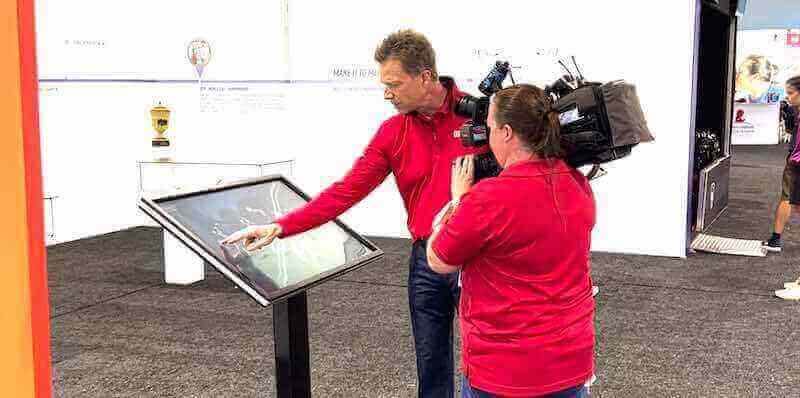
Interactive touchscreens transform how cultural institutions present collections, tell stories, and engage audiences. When implemented thoughtfully, these digital displays create immersive experiences that deepen understanding, accommodate diverse learning styles, extend limited physical space, and generate engagement data informing continuous improvement. This comprehensive guide examines everything museums and galleries need to know about implementing interactive touchscreen technology—from selecting appropriate hardware and software through designing compelling content and measuring visitor engagement.
Why Interactive Touchscreens Transform Museum & Gallery Experiences
Before examining implementation specifics, cultural institutions should understand the fundamental advantages interactive touchscreens provide compared to traditional display methods and why these technologies have become essential rather than optional enhancements.
Addressing Physical Space Limitations
Museums and galleries perpetually struggle with limited display space. Collections typically contain vastly more objects than institutions can physically exhibit. Storage facilities hold thousands of artifacts visitors never see while curators make difficult decisions about what merits precious exhibition space.
Unlimited Virtual Display Capacity — A single touchscreen display can showcase thousands of collection items, archival photographs, historical documents, or related contextual materials without requiring additional physical space. Visitors can explore entire collections through searchable databases rather than viewing only the small fraction that fits in exhibition halls.
Deep-Dive Content Without Physical Clutter — Interactive displays enable layered information architecture. Initial screens provide overview content maintaining visual clarity while detailed information remains accessible through user-initiated exploration. Visitors interested in specific objects can access extensive descriptions, provenance details, related scholarship, and multimedia content without cluttering physical spaces with dense text panels that overwhelm casual visitors.
Rotating Digital Exhibitions — Touchscreen content updates instantly, enabling rotating digital exhibitions highlighting different collection aspects without costly physical reinstallation. Seasonal themes, anniversary commemorations, or connections to current events can be programmed months in advance and automatically update without staff intervention.
Accommodating Diverse Visitor Needs and Learning Styles
Cultural institutions serve audiences with vastly different backgrounds, interests, abilities, and learning preferences. Traditional static displays attempt to serve all visitors identically, inevitably satisfying some while disappointing others.
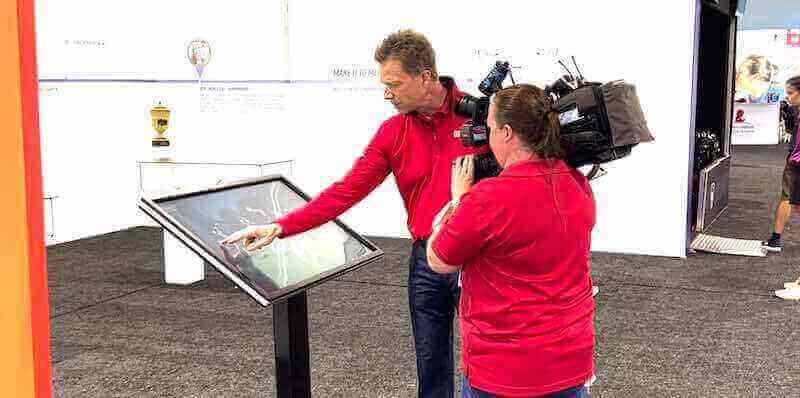
Individualized Exploration Paths — Interactive touchscreens enable visitors to direct their own experiences. Museum novices can access introductory content and visual storytelling while scholars explore detailed research and primary sources. Families with children can select age-appropriate activities while serious collectors examine technical details and acquisition histories.
Multilingual Content Delivery — Physical multilingual labels require expensive space and become visually cluttered. Touchscreens deliver unlimited language options through simple interface selection. International visitors access content in native languages without requiring separate audio devices or printed guides that quickly become outdated.
Accessibility for Visitors with Disabilities — Properly designed touchscreen interfaces support visitors with various disabilities far more effectively than traditional displays. Screen readers provide content to visitors with visual impairments, adjustable text sizes accommodate low vision, and multimedia presentations with captions serve visitors with hearing loss. Interactive technology, when implemented with accessibility as core design principle rather than afterthought, creates genuinely inclusive experiences.
Enhancing Educational Impact Through Multimedia
Museums and galleries exist primarily as educational institutions, yet traditional display methods limit pedagogical approaches to static objects, printed text, and passive viewing.
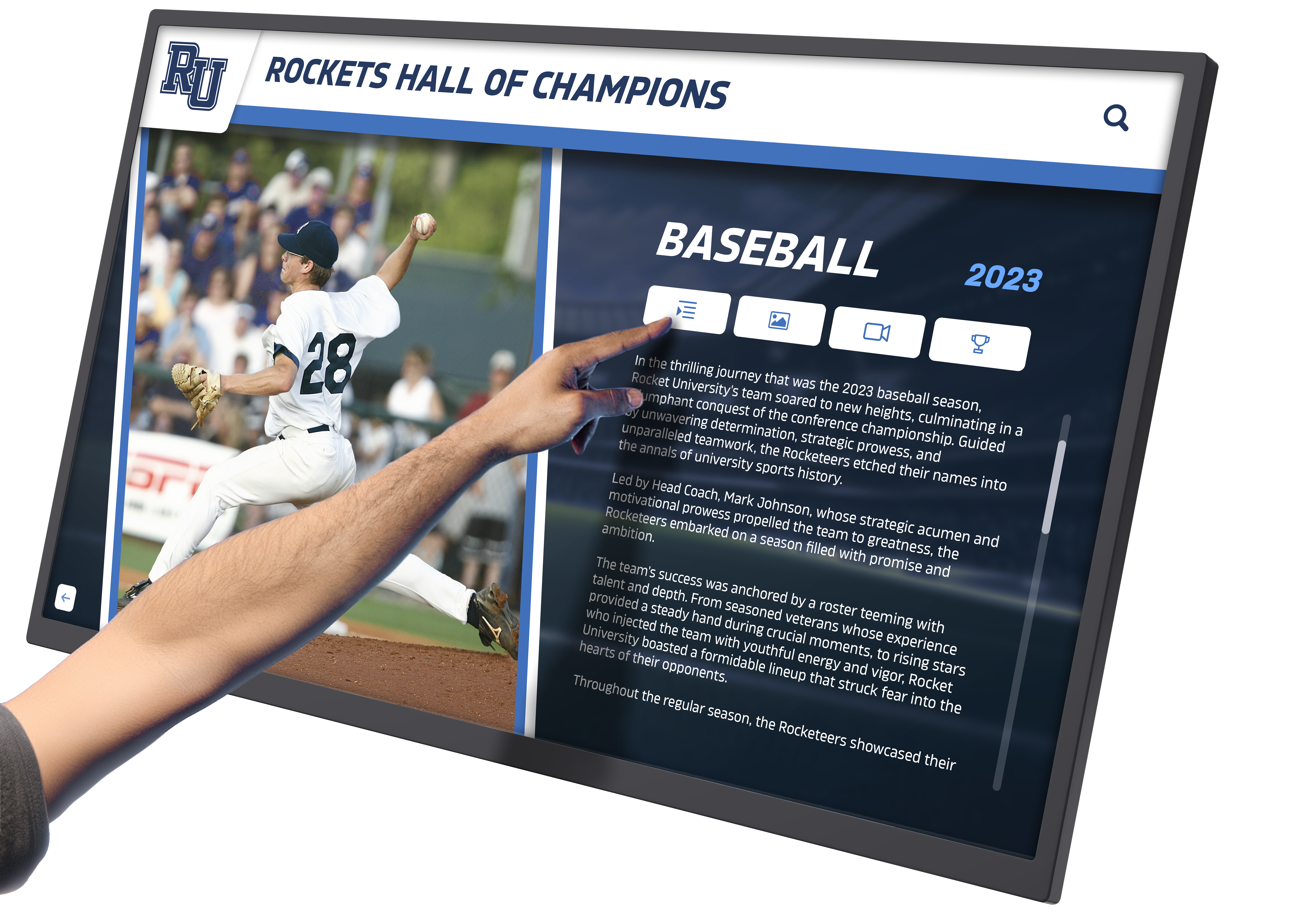
Contextual Storytelling Through Video and Animation — Video content brings historical events to life, demonstrates artistic techniques, shows objects in original contexts, or presents curator insights. Animation illustrates processes, reconstructs damaged artifacts, or visualizes historical environments impossible to photograph. These multimedia approaches deepen understanding far more effectively than text descriptions alone.
Interactive Timelines and Comparative Analysis — Touchscreens enable interactive timelines letting visitors explore historical progressions at their own pace, zooming into specific periods or comparing simultaneous developments across geography or disciplines. Side-by-side comparative viewing helps visitors understand artistic evolution, technological development, or cultural variation through direct visual comparison.
Virtual Collection Access and Behind-the-Scenes Content — Interactive displays can showcase conservation work, curatorial decision-making, acquisition stories, or donor contributions that contextualize collections. Behind-the-scenes content humanizes institutions while educating visitors about museum operations they never otherwise see.
Technology Considerations: Hardware Selection for Cultural Institutions
Selecting appropriate touchscreen hardware requires balancing visitor experience quality, durability for public environments, accessibility requirements, and budget constraints that cultural institutions invariably face.
Display Size and Resolution Requirements
Touchscreen size significantly impacts both user experience and cost, requiring thoughtful consideration of intended use cases and physical constraints.
Single-User Interactive Kiosks (22-32 inches) — Smaller displays work well for individual research stations, wayfinding directories, or detailed object exploration where single visitors interact independently. These compact screens cost less, consume minimal floor space, and serve focused applications effectively.
Small Group Collaborative Displays (42-55 inches) — Mid-size touchscreens accommodate small family groups or couples exploring together. These displays balance cost with collaborative experience potential, enabling parents and children or pairs of visitors to interact simultaneously.
Large-Format Presentation Walls (65-86 inches) — Large displays create focal points in exhibition spaces, accommodating groups of visitors and creating impressive visual statements. These screens work well for engaging storytelling, large-format image viewing, or flagship interactive experiences where museums want technology to make dramatic impact.
Resolution Standards — Minimum 1920x1080 (Full HD) resolution should be considered baseline for professional museum installations. 4K (3840x2160) resolution becomes essential for displays larger than 55 inches or when showcasing high-resolution artwork, archival photographs, or detailed scientific imagery where visitors examine fine details.
Touch Technology: Capacitive vs. Infrared vs. Optical
Different touch detection technologies offer distinct advantages and limitations for museum environments requiring consideration based on specific use cases.
Capacitive Touch Technology — Used in smartphones and tablets, capacitive screens detect electrical conductivity from fingers, providing highly responsive, accurate touch detection. These displays offer the most familiar user experience and support multi-touch gestures visitors know from personal devices. However, capacitive screens require bare finger contact and don’t register touch through gloves or from styluses (unless specifically designed for capacitive styluses), potentially limiting accessibility.
Infrared Touch Technology — Infrared touch frames detect interruption of invisible infrared light beams across screen surfaces, working with fingers, gloved hands, or styluses. This technology proves particularly valuable in museums where visitors may wear gloves or where protective covers over screens are desired. Infrared systems work with any screen type—including existing displays—enabling retrofitting of standard monitors into interactive kiosks.
Optical Touch Technology — Optical systems use cameras detecting interruption of surface area, similar to infrared but using visible light imaging. These systems support very large touch surfaces beyond standard display sizes and work with gloved hands or styluses, though they may be less precise than capacitive alternatives.
For most museum applications, commercial-grade capacitive touchscreens provide optimal balance of responsiveness, reliability, and visitor familiarity, with infrared technology serving specialized applications requiring glove operation or screen protection.
Durability and Public Environment Considerations
Museum and gallery touchscreens face constant public use from diverse visitors with varying levels of care, requiring commercial-grade hardware designed for demanding environments.
Commercial vs. Consumer Grade Displays — Consumer televisions and monitors designed for occasional home use fail quickly in museum environments with 8-12 hours daily operation and constant touch interaction. Commercial displays feature industrial-grade components, enhanced cooling systems, and touch surfaces designed for thousands of daily interactions across multi-year deployments.
Protective Glass and Anti-Vandalism Features — Hardened glass surfaces resist scratching from jewelry, keys, or deliberate vandalism. Tamper-resistant enclosures protect electronics from curious children or malicious damage. Edge-to-edge glass without exposed bezels prevents damage to screen edges and creates more attractive installations matching museum aesthetic standards.
Environmental Tolerance — Museums typically maintain climate-controlled environments protecting collections, but exhibition spaces may experience wider temperature and humidity variation than consumer electronics tolerate. Commercial displays specify wider operating temperature ranges and sealed components protecting against dust or humidity in challenging environments.
Warranty and Service Expectations — Consumer displays typically include one-year warranties assuming light residential use. Commercial displays often provide three-year warranties with advance replacement options minimizing downtime when failures occur. For essential installations, this service difference justifies price premiums.
Accessibility Standards and ADA Compliance
Cultural institutions receiving federal funding or classified as public accommodations must ensure touchscreen installations comply with Americans with Disabilities Act (ADA) requirements and Web Content Accessibility Guidelines (WCAG).
Physical Accessibility Requirements — ADA Standards for Accessible Design specify maximum mounting heights ensuring wheelchair users can reach touchscreen controls. Forward reach maximum of 48 inches and side reach maximum of 54 inches determine touchscreen height for accessible installations. Knee and toe clearance beneath displays enables close wheelchair approach.
Digital Content Accessibility — WCAG 2.1 Level AA compliance should be considered minimum standard for museum touchscreen software. Requirements include sufficient color contrast for visitors with low vision, text alternatives for images serving visitors using screen readers, keyboard navigation supporting visitors unable to use touchscreens, and clearly labeled interactive elements preventing confusion.
Multi-Sensory Design — Accessible design extends beyond minimum compliance to universal design principles. Audio descriptions complement visual content for visitors with vision impairments, captions and transcripts serve visitors with hearing loss, and simple navigation with clear visual hierarchy helps visitors with cognitive disabilities.
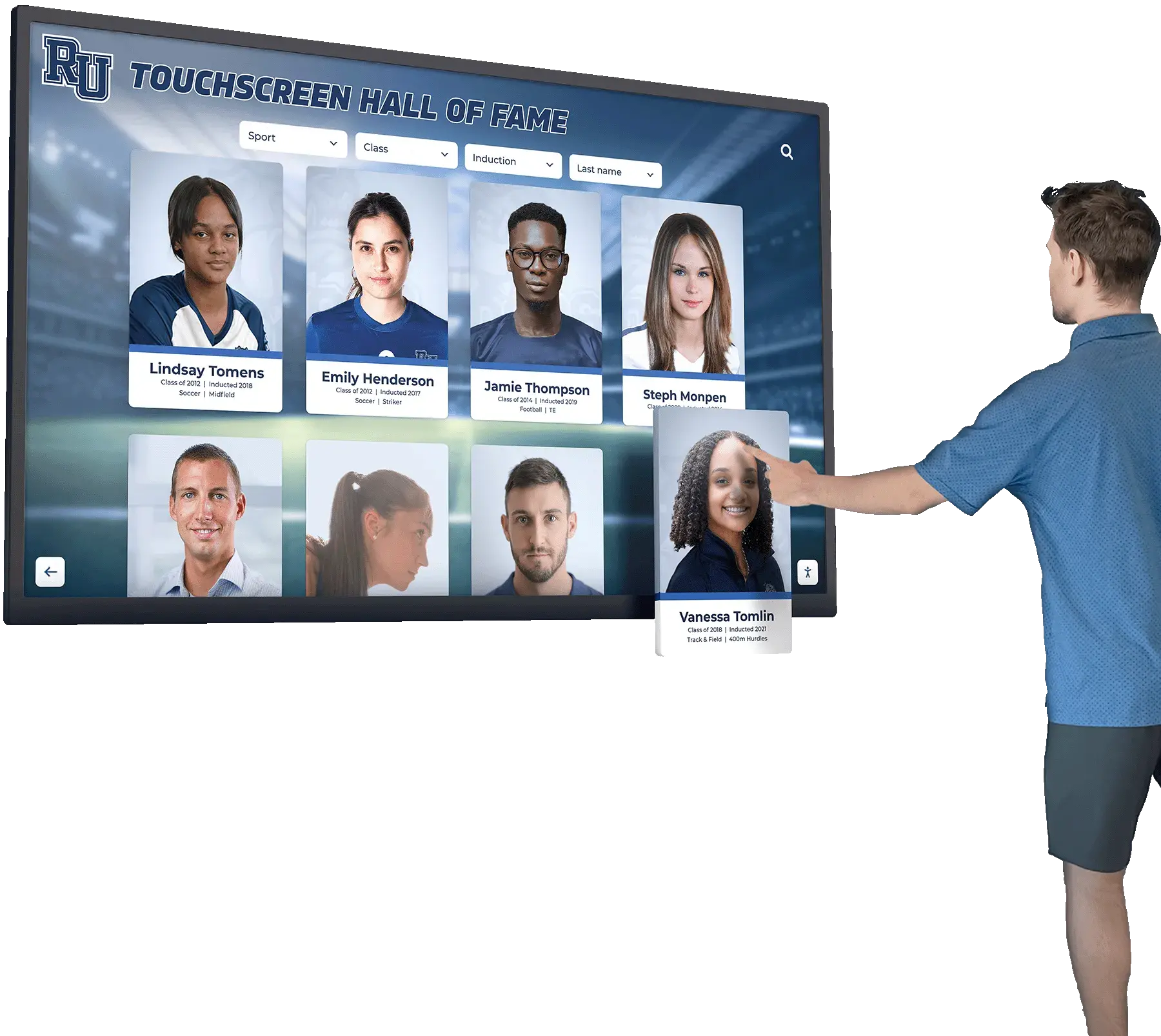
Solutions like digital recognition displays from providers including Rocket Alumni Solutions specifically address accessibility requirements through WCAG-compliant interfaces, adjustable text sizing, high-contrast modes, and screen reader compatibility—features particularly important for publicly funded cultural institutions.
Software and Content Management Solutions
Hardware represents only half of successful interactive touchscreen implementations. Software determines user experience, content flexibility, and long-term viability of digital installations.
Content Management System Requirements
Museums and galleries need content management platforms enabling non-technical staff to update exhibitions, add collection items, and modify content without developer intervention or expensive vendor support.
User-Friendly Administrative Interfaces — Museum staff managing touchscreen content typically lack programming skills or technical training. Cloud-based content management systems with straightforward visual editors, drag-and-drop functionality, and WYSIWYG previews enable curators and educators to update content independently. This accessibility proves essential for sustainable operations where content remains current without IT dependency.
Multi-User Collaboration and Workflow Management — Museum content creation involves multiple contributors—curators provide scholarly content, educators adapt materials for general audiences, designers ensure visual consistency, and administrators approve final publications. Effective content management systems support collaborative workflows with role-based permissions, content approval processes, and version control preventing conflicts when multiple staff members work simultaneously.
Searchable Content Architecture — Visitors expect search functionality allowing direct access to specific artists, objects, time periods, or topics without browsing through hierarchical menus. Content management systems should support robust search with filtering, suggested results, and related content recommendations helping visitors discover connections.
Template Systems for Visual Consistency — Pre-designed templates ensure professional visual design across all content while enabling staff without design skills to create attractive displays. Template systems maintain institutional branding, ensure accessibility compliance, and prevent the visual chaos that emerges when multiple contributors design freeform content.

Integration with Collection Management Systems
Museums typically maintain digital collection management systems (TMS, PastPerfect, Mimsy, etc.) containing authoritative data about objects, provenance, and related research. Interactive touchscreen software should integrate with these systems rather than requiring duplicate data entry.
Synchronized Content Updates — API connections between collection databases and touchscreen software enable automatic content updates. When curators update object records, add new acquisitions, or enhance descriptions in collection systems, changes automatically propagate to public-facing touchscreens without manual intervention.
Digital Asset Management Integration — High-resolution images, conservation photography, archival documents, and multimedia content typically reside in digital asset management systems separate from collection databases. Touchscreen software should reference these assets directly, displaying authoritative high-resolution images rather than maintaining separate copies that become outdated.
Avoiding Data Silos — Museums cannot sustain systems requiring curators to maintain content in collection databases, then separately update touchscreen content, while also managing website content, printed materials, and mobile apps. Integrated systems maintain single authoritative data sources feeding all public communications, reducing workload and eliminating version conflicts.
Analytics and Visitor Engagement Measurement
Digital touchscreen systems generate detailed engagement data impossible to collect from traditional displays, enabling evidence-based exhibition improvement.
Interaction Tracking and Heatmaps — Analytics reveal which content visitors explore, how long they engage with specific screens, what search terms they use, and where interactions terminate. Heatmaps show which screen areas receive attention while other zones are ignored, informing interface redesign improving usability.
Visitor Flow and Dwell Time Analysis — Museums gain insights into how visitors move through exhibitions, which displays generate sustained engagement versus brief glances, and at what point visitors disengage. This data identifies successful exhibitions deserving expansion and struggling installations requiring revision.
A/B Testing for Continuous Improvement — Digital systems enable experimentation with different content presentations, navigation structures, or multimedia approaches. A/B testing shows which designs generate deeper engagement, informing evidence-based improvements rather than relying on assumptions about visitor preferences.
Privacy-Compliant Data Collection — Analytics should track aggregate behavior patterns without collecting personally identifiable information, respecting visitor privacy while still providing actionable insights. Systems can measure engagement without surveillance or tracking individual visitors across sessions.
Content Design Best Practices for Museum Touchscreens
Technology excellence means little when paired with poorly designed content. Effective museum touchscreen experiences require thoughtful content design addressing specific challenges of public interactive displays.
Information Architecture and Navigation Design
Visitors approaching touchscreens lack context about available content, creating navigation challenges fundamentally different from websites where users arrive with specific intentions after searching.
Clear Entry Points and Straightforward Home Screens — Home screens should immediately communicate what visitors can explore through clear categories, featured content, and prominent search options. Avoid dense information or complex menu hierarchies that confuse visitors. Simple choices like “Explore by Artist,” “Explore by Time Period,” “Search Collection,” or “Featured Exhibition” provide clear starting points.
Shallow Information Hierarchies — Visitors rarely navigate more than 2-3 levels deep into nested menus before abandoning interactions. Prioritize broad, shallow content structures over deep hierarchies. If content requires deep nesting, provide shortcuts like breadcrumb navigation, related content links, or visual sitemaps helping visitors understand their location within content structure.
Persistent Navigation and Clear Exit Paths — Every screen should provide obvious navigation to home, back to previous screen, or related content. Visitors uncomfortable with technology need constant reassurance about how to escape current screens without feeling trapped. Clear, consistently positioned navigation prevents frustration common when visitors cannot determine how to proceed or return.
Auto-Reset to Home Screen — Public touchscreens should automatically return to home screens after 60-90 seconds of inactivity, ensuring the next visitor encounters fresh starting points rather than mid-interaction screens left by previous users. This reset also protects privacy by clearing any personal searches or bookmarks.

Writing for Touchscreen Displays
Content writing for interactive displays requires different approaches than print labels, websites, or traditional museum text panels.
Concise Text Optimized for Standing Readers — Visitors interact with touchscreens while standing in galleries, typically for brief periods between viewing physical objects. Touchscreen text should be significantly shorter than website content, using concise paragraphs (3-4 sentences maximum), bulleted lists, and clear hierarchies emphasizing key points visitors can absorb quickly.
Scannable Formatting and Visual Hierarchy — Visitors scan rather than reading linearly. Bold text highlighting key concepts, descriptive subheadings previewing content, and strategic white space guiding eye movement improve comprehension. Avoid dense blocks of uniform text that visitors skip entirely.
Multiple Reading Levels — Content architecture should accommodate both casual visitors seeking brief information and motivated learners desiring depth. Initial screens provide overview content with prominent “Learn More” options expanding to detailed text, scholarly sources, or related resources. This layered approach serves diverse audiences without overwhelming casual visitors or disappointing motivated learners.
Conversational Tone Appropriate for Direct Interaction — Interactive touchscreens feel more like conversations than traditional museum labels. Slightly more conversational writing tone—using “you” to address visitors, asking questions, or providing choices—creates engagement while maintaining educational authority.
Multimedia Content: When to Use Video, Audio, and Animation
Multimedia content dramatically enhances educational impact when deployed strategically, though overuse creates confusing experiences that detract from physical collections.
Video for Demonstrating Processes and Techniques — Video excels at showing processes difficult to describe through text or static images. Artistic techniques, conservation work, scientific methods, or historical events gain clarity through video demonstration. Keep videos brief (60-90 seconds) unless specifically designed for dedicated viewing stations where visitors can watch extended content.
Audio for Curatorial Voices and Oral Histories — Audio content humanizes exhibitions through curator insights, artist statements, or oral histories from community members. Audio complements touchscreens without requiring visitors to read while standing. Provide headphone jacks or directional speakers preventing audio from multiple displays from creating cacophony in galleries.
Animation for Reconstruction and Visualization — Animation reconstructs damaged artifacts to original appearance, visualizes historical environments no longer existing, or illustrates scientific concepts impossible to photograph. These applications leverage animation’s unique capabilities rather than using motion simply for visual interest.
Images with Deep Zoom Capabilities — High-resolution zoomable images let visitors examine fine details in paintings, decorative arts, manuscripts, or scientific specimens. This capability provides access to details impossible to see in physical viewing, especially when objects are behind glass or positioned at distance.
Strategic Use Rather than Multimedia Overload — Not every topic needs video, animation, or audio. Thoughtfully deployed multimedia enhances specific content while maintaining focus on physical collection objects. Touchscreens should complement physical collections rather than competing for attention.
Implementation Planning and Project Management
Successful touchscreen implementations require systematic planning addressing technology decisions, content development, installation logistics, and ongoing operations.
Needs Assessment and Strategic Planning
Before procuring technology, museums should conduct thorough needs assessment defining what problems touchscreens will solve and what success looks like.
Visitor Experience Gaps and Pain Points — Identify specific visitor experience problems touchscreens will address. Common needs include space constraints limiting collection access, visitors unable to find specific information, insufficient multilingual content, accessibility barriers, or inability to provide depth satisfying motivated learners without overwhelming casual visitors.
Collection Access and Education Goals — Define educational objectives guiding touchscreen content. Goals might include showcasing collection objects not physically displayed, providing contextual information about artistic movements, connecting objects to historical events, or enabling individualized exploration paths based on visitor interests.
Technology Integration Strategy — Determine how touchscreens fit within broader institutional technology ecosystems. Consider relationships with collection databases, websites, mobile apps, and other digital touchpoints ensuring coordinated visitor experiences rather than disconnected technology projects.
Resource and Budget Planning — Establish realistic budgets including hardware, software, content development, installation, training, and ongoing operations. Museums commonly underestimate content development effort, which typically exceeds hardware costs for comprehensive implementations. Budget should account for multi-year total cost of ownership rather than just initial installation.
Content Development Workflow
Creating compelling touchscreen content requires cross-functional collaboration between curators, educators, designers, and technology staff.
Content Strategy and Information Architecture — Begin with content strategy defining what topics visitors can explore, how content organizes into categories, what media types support each topic, and navigation flows connecting content. This strategic foundation prevents ad-hoc development creating confusing experiences.
Curatorial Research and Scholarship — Curators provide authoritative content about collection objects, artists, historical context, provenance, and related scholarship. This foundational research ensures educational accuracy and institutional credibility.
Educational Adaptation — Museum educators adapt curatorial research for general audiences, determining appropriate reading levels, identifying key concepts visitors should understand, developing activity components, and creating family-friendly content serving multigenerational groups.
Media Production and Design — Designers create visual layouts, photographers capture high-resolution images, videographers produce multimedia content, and user experience specialists ensure straightforward interaction design. This production phase translates content strategy into actual touchscreen experiences.
Quality Assurance and Usability Testing — Before public launch, conduct thorough testing with staff, volunteers, and representative visitor groups identifying navigation confusion, unclear content, accessibility issues, or technical problems. Iterative refinement based on testing dramatically improves final quality.
Many cultural institutions implementing visitor engagement technology benefit from platforms like those offered by Rocket Alumni Solutions, which provide straightforward content management enabling museum staff to develop and maintain content without extensive technical dependencies.
Physical Installation and Environmental Integration
Touchscreen hardware requires thoughtful physical installation integrating technology with exhibition design rather than creating jarring technology additions disrupting gallery aesthetics.
Architectural Integration — Work with exhibition designers ensuring touchscreens complement rather than compete with physical collections. Consider mounting options (wall-mounted, freestanding kiosks, built-in cabinetry), cable management hiding visible wiring, and finishes matching gallery aesthetic standards.
Lighting Considerations — Screen glare from gallery lighting can render displays unreadable. Position screens away from direct lighting, use matte-finish protective glass reducing reflections, or adjust gallery lighting minimizing screen glare while still illuminating physical collections appropriately.
Power and Network Infrastructure — Ensure adequate electrical capacity for display power consumption and sufficient network bandwidth for web-based content management and analytics. Wireless network coverage should provide reliable connectivity at installation locations, or plan for hardwired ethernet drops.
Physical Security and Theft Prevention — Secure installations preventing theft through tamper-resistant mounting, locked rear-access panels, and security cables for any removable components. While cultural institutions avoid prison-like security, reasonable precautions prevent opportunistic theft or damage.
Accessibility Mounting Heights — Install touchscreens at heights meeting ADA requirements ensuring wheelchair users can reach controls. When single display serves both standing and seated users, position important interactive elements in zones all visitors can reach comfortably.
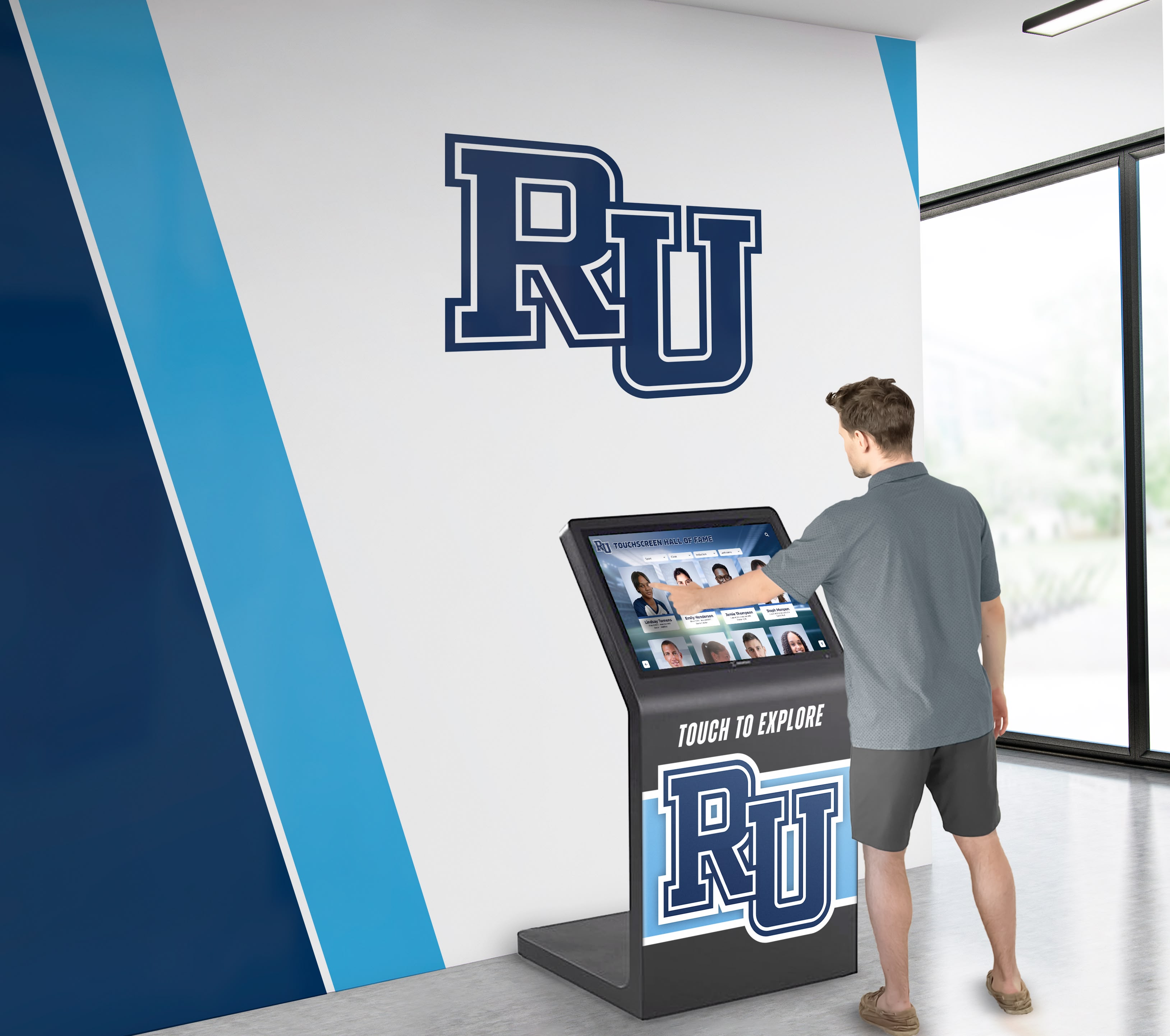
Visitor Engagement Strategies and Best Practices
Technology alone doesn’t create engagement. Successful implementations combine capable hardware and thoughtful content with strategies encouraging visitor interaction.
Encouraging First-Time Interaction
Many visitors, particularly older adults or those less comfortable with technology, hesitate to use unfamiliar touchscreens without encouragement.
Clear Signage and Usage Instructions — Brief instructional signage explaining what visitors can explore and how to get started reduces intimidation. Simple instructions like “Touch to Begin,” “Search Our Collection,” or “Explore by Topic” provide explicit permission and guidance.
Staff and Volunteer Facilitation — Gallery attendants, docents, or volunteers actively inviting visitors to try touchscreens dramatically increases usage compared to passive installations visitors ignore. Brief demonstrations showing how to search for favorite artists or navigate to featured content encourages tentative users to explore independently.
Visible Engagement by Others — Visitors are more likely to try touchscreens when seeing others successfully interacting. Position high-traffic displays where visitors observe other users engaging, reducing apprehension about trying unfamiliar technology.
Attracting Attention Through Motion and Visual Appeal — Ambient content with subtle motion when displays are idle catches passing attention better than static welcome screens. Slideshow rotations featuring collection highlights, typographic animations, or abstract visualizations signal that displays are active and invite exploration without overwhelming gallery spaces.
Creating Shareable and Memorable Experiences
Digital touchscreens enable takeaway experiences extending engagement beyond gallery visits and creating organic marketing through visitor sharing.
QR Code Content Extensions — Generate unique QR codes allowing visitors to access detailed information, additional media, or personalized collection highlights on personal devices. Visitors can save content for later review, share with friends, or continue learning after leaving museums.
Social Media Integration — Enable visitors to share favorite discoveries on social platforms directly from touchscreens (with appropriate privacy options). When visitors share collection items or exhibition highlights, museums gain authentic marketing far more effective than institutional promotional content.
Email Collection Lists and Newsletters — Allow visitors to optionally provide email addresses to receive detailed information about artists or objects they explored. This builds museum contact lists while providing genuine value to motivated visitors wanting to continue learning.
Printed Takeaways — For locations where visitors cannot easily photograph or access personal devices, consider small-format printing allowing visitors to take home customized object information or personalized collection highlights. These physical takeaways extend engagement while respecting photography restrictions.
Family and Group Engagement
Touchscreens serve groups differently than individual visitors, requiring design accommodations for collaborative use.
Family Activity Stations — Create touchscreen content specifically designed for adults and children exploring together. Scavenger hunts encouraging families to find specific objects in galleries, age-appropriate games teaching concepts from exhibitions, or creative activities like virtual collection building engage entire families.
Collaborative Learning Activities — Design multi-user activities where groups work together solving puzzles, debating choices, or creating collaborative art. Social interaction around touchscreens transforms individual learning into shared family or friend group experiences creating stronger memories.
Multi-Touch Support for Simultaneous Interaction — Touchscreen hardware and software supporting multiple simultaneous touch points allows family members to interact together rather than taking turns. Parents and children can explore different elements concurrently, then discuss discoveries.
Appropriate Height for Mixed Age Groups — Consider installing some touchscreens at heights accessible to children while others serve primarily adult users. Family-focused displays might position controls lower than standard accessibility requirements suggest.
Organizations implementing comprehensive visitor engagement programs often explore platforms like public library digital archive systems which share similar goals of democratizing access to collections.
Measuring Success and Return on Investment
Cultural institutions must demonstrate that technology investments deliver educational and operational value justifying costs.
Defining Success Metrics
Clear success metrics established before implementation enable objective assessment of whether touchscreen investments achieved intended goals.
Visitor Engagement Metrics — Track average interaction duration, percentage of gallery visitors using touchscreens, content areas generating highest engagement, and return visits to displays. These metrics reveal whether visitors find touchscreens valuable enough to invest time exploring content.
Educational Impact Assessment — Measure learning outcomes through pre/post visitor surveys, observation studies tracking how touchscreen exploration influences physical object viewing, or formative evaluation during content development. Educational effectiveness matters more than simple usage statistics for mission-driven institutions.
Operational Efficiency Improvements — Quantify staff time saved through digital content delivery replacing printed materials requiring frequent replacement, reduced demand for live interpretation due to accessible self-guided content, or ability to operate with fewer interpretive staff while maintaining visitor satisfaction.
Accessibility and Inclusion Metrics — Track usage by visitors with disabilities, multilingual content access patterns, and whether diverse audience segments engage equally with digital content. Technology should improve inclusion measurably, not just theoretically.
Cost per Visitor Engagement — Calculate total cost of ownership (hardware, software, content development, maintenance) divided by number of visitor engagements creating cost-per-engagement metrics comparable to other interpretive programs like guided tours or printed materials.
Continuous Improvement Through Data Analysis
Digital systems enable iterative improvement impossible with static displays through systematic analysis of visitor behavior data.
Content Performance Analysis — Identify which collection objects, artists, or topics generate deepest engagement versus content visitors quickly abandon. Double down on successful content patterns while revising or removing underperforming content.
Usability Issue Identification — Analytics revealing where visitors get stuck, frequently use “back” buttons, or abandon interactions suggest navigation problems or unclear content requiring interface redesign.
Search Query Analysis — Review what visitors search for, identifying collection strengths to emphasize, gaps where visitors seek content not available, or terminology differences between institutional language and visitor vocabulary.
Seasonal and Exhibition-Related Patterns — Track how touchscreen usage varies across time of day, day of week, or correlation with temporary exhibitions. These patterns inform staffing decisions, content rotation strategies, or targeted promotions.
Benchmark Comparisons — Compare engagement metrics across different display locations, content types, or hardware configurations identifying what works best in specific contexts. These benchmarks guide future installations and content development priorities.
Museums implementing comprehensive digital strategy often integrate touchscreens with broader recognition systems, similar to interactive display technology transforming institutional spaces across educational and cultural sectors.
Common Pitfalls and How to Avoid Them
Learning from common implementation mistakes helps museums avoid expensive failures.
Technology-First Rather Than Content-First Planning
Many institutions select hardware before defining content strategy, discovering too late that chosen technology doesn’t support intended experiences.
Solution: Content Strategy Before Technology Selection — Define what visitors will explore, how content organizes, what media types you’ll create, and desired user interactions before evaluating hardware or software. Technology decisions should follow from content requirements rather than determining what content becomes possible.
Underestimating Content Development Effort and Cost
Museums frequently budget appropriately for hardware while severely underestimating content development time and cost, resulting in mediocre content undermining expensive technology.
Solution: Realistic Content Budgets — Plan for content development costs typically equaling or exceeding hardware expenses for comprehensive implementations. Budget for professional photography, video production, writing, translation, accessibility testing, and usability evaluation—not just curator time adapting existing text.
Assuming Visitors Will Intuitively Use Touchscreens
Designers familiar with technology assume intuitive interfaces others find confusing, especially older visitors or those uncomfortable with touchscreen interactions.
Solution: Extensive Usability Testing with Representative Visitors — Test with diverse visitor groups including older adults, families with children, visitors with disabilities, and non-English speakers. Observe where confusion occurs and iterate designs until truly intuitive for general audiences, not just tech-comfortable staff.
Creating Information Overload
Digital capacity tempts museums to include excessive content, overwhelming visitors with choices and dense information they cannot absorb during brief gallery visits.
Solution: Ruthless Content Curation — Less content, better organized, serves visitors more effectively than comprehensive collections requiring extensive navigation. Prioritize highlights, provide clear paths to depth for motivated visitors, but design for brief interactions as the norm.
Neglecting Ongoing Maintenance and Content Updates
Initial enthusiasm creates robust launch content, but many installations stagnate as staff attention shifts elsewhere and no one owns ongoing content responsibility.
Solution: Sustainable Operations Planning — Establish clear content ownership, regular update schedules, and efficient content workflows before launch. Choose content management systems enabling staff to update content without technical assistance or vendor dependency. Build operations into annual work plans rather than treating content as one-time project.
Inaccessible Designs Excluding Visitors with Disabilities
Accessibility often becomes afterthought rather than foundational design principle, resulting in installations excluding visitors with disabilities and potentially violating legal requirements.
Solution: Universal Design from Project Start — Include accessibility expertise throughout planning, involve visitors with disabilities in usability testing, and implement WCAG 2.1 Level AA standards as minimum compliance. Design for diverse abilities from the beginning rather than retrofitting accessibility features late in development.
Future Trends in Museum Touchscreen Technology
Understanding emerging trends helps museums plan implementations remaining relevant across multi-year deployments.
Artificial Intelligence and Personalized Recommendations
AI-powered recommendation engines suggest content based on visitor interests demonstrated through initial interactions, creating personalized exploration paths similar to streaming media services.
Contextual Recommendations — After visitors explore several impressionist paintings, systems suggest related artists, time periods, or thematic connections. This intelligent curation helps visitors discover collection relationships without requiring art historical knowledge.
Natural Language Search and Chatbot Assistants — Rather than keyword searching, visitors ask questions in natural language (“Show me landscape paintings from the 1800s”) with AI interpreting intent and delivering relevant results. Chatbot assistants answer visitor questions, provide directions, or explain concepts through conversational interaction.
Augmented Reality Integration
AR technology layers digital information over physical collection objects, creating blended experiences combining tangible objects with contextual digital content.
AR-Enhanced Object Labels — Visitors point tablets or phones at objects, revealing animated labels, multimedia content, or 3D visualizations superimposed over physical views. This approach provides digital enhancement without requiring visitors to leave galleries for separate touchscreen stations.
Virtual Reconstruction of Damaged or Incomplete Objects — AR reconstructs damaged sculptures to original appearance, completes fragmentary archaeological finds, or visualizes how objects functioned in original contexts. These reconstructions help visitors understand objects difficult to interpret from fragments alone.
Voice Control and Hands-Free Interaction
Voice interfaces enable touchscreen control without physical contact—valuable for accessibility, cleanliness concerns, or multi-tasking family situations.
Voice-Activated Search and Navigation — Visitors speak requests rather than typing or tapping, useful for visitors with mobility impairments affecting precise touch control or when visitor’s hands are occupied with bags or children.
Multilingual Voice Interfaces — Voice control in multiple languages serves international visitors more naturally than text-based navigation in unfamiliar languages.
Sustainable and Energy-Efficient Display Technology
Cultural institutions increasingly prioritize environmental sustainability in operations and technology procurement.
Low-Power Display Technologies — LED-backlit displays consume significantly less power than older technologies. Future OLED and microLED displays promise even greater efficiency, reducing operational costs and environmental impact.
Automatic Brightness Adjustment and Sleep Modes — Ambient light sensors adjust screen brightness automatically, reducing power consumption while improving visibility. Displays enter low-power sleep modes during gallery closures rather than running continuously.
Institutions planning long-term digital strategies often evaluate comprehensive solutions like platforms supporting virtual collections and recognition systems that integrate with physical installations.
Case Examples: Successful Museum Touchscreen Implementations
Examining successful implementations across different institution types illustrates effective approaches to common challenges. Rather than citing specific client installations, consider these general implementation patterns proven effective:
Art Museums and Gallery Applications
Art museums leverage touchscreens to provide deep dives into artistic techniques, historical context, and artist biographies without cluttering gallery walls with extensive text panels. High-resolution zoomable images enable visitors to examine brushwork and details impossible to see behind protective glass. Interactive timelines show artistic movement evolution and influences between artists.
History Museums and Archives
History institutions use touchscreens to showcase archival materials, documents, photographs, and oral histories too fragile or numerous for physical display. Interactive maps illustrate historical events geographically, timelines connect simultaneous developments, and searchable databases let visitors explore specific topics, time periods, or biographical subjects matching their interests.
Science and Natural History Museums
Science museums implement touchscreens for interactive educational content explaining complex concepts through animation and simulation. Visitors manipulate variables in virtual experiments, explore 3D models of specimens, or access detailed taxonomic information about natural history collections. These applications leverage digital capabilities impossible with physical exhibits alone.
Cultural Heritage and Community Museums
Community museums serve diverse audiences telling local stories through oral histories, historical photographs, and community-contributed content. Multilingual touchscreen interfaces serve immigrant populations in their native languages. These institutions particularly benefit from digital archiving systems democratizing access to collections that previously remained accessible only to researchers.
Specialized Recognition Applications
Museums increasingly document institutional histories, benefactor contributions, and leadership through digital recognition displays. These applications share characteristics with comprehensive recognition and hall of fame systems used across educational, athletic, and cultural organizations.
Vendor Selection and Procurement Considerations
Choosing appropriate technology partners significantly impacts implementation success and long-term sustainability.
Evaluating Software Providers
Software selection determines long-term content management flexibility, user experience quality, and operational sustainability more than hardware choices.
Content Management Capabilities — Prioritize platforms enabling museum staff to independently update content through intuitive interfaces requiring no programming skills. Cloud-based systems accessible from any device provide flexibility for distributed teams.
Accessibility and Standards Compliance — Verify WCAG 2.1 Level AA compliance through third-party accessibility audits, not just vendor claims. Ensure platforms support screen readers, keyboard navigation, adjustable text sizes, and high-contrast modes.
Integration Capabilities — Evaluate ability to connect with existing collection management systems, digital asset management platforms, and institutional websites through documented APIs and standard data formats.
Customization and Branding — Assess flexibility to match institutional branding, create custom layouts, and design unique experiences rather than being locked into generic templates used by all platform clients.
Total Cost of Ownership — Compare not just initial licensing costs but ongoing subscription fees, content update charges, support costs, and typical lifespan before platform replacement becomes necessary.
Vendor Stability and Support — Research vendor financial stability, client retention rates, support responsiveness, and track record of product development. Technology partnerships lasting 5-10 years require stable vendors committed to ongoing platform investment.
Hardware Procurement Best Practices
Commercial-Grade Specifications — Specify commercial displays designed for continuous operation with minimum three-year warranties. Avoid consumer television or monitor models regardless of attractive pricing.
Standardization Across Installations — Use consistent hardware models across multiple installations simplifying maintenance, spare parts inventory, and staff training. Mixed hardware creates operational complexity.
Professional Installation Services — Invest in professional mounting, cable management, and network configuration rather than attempting in-house installation lacking specialized expertise or proper tools.
Extended Warranty and Support Agreements — Consider extended warranties or advance replacement agreements minimizing downtime when hardware failures occur.
Solutions like Rocket Alumni Solutions provide comprehensive packages integrating hardware, software, content management, and ongoing support—simplifying procurement while ensuring all components work together cohesively rather than requiring museums to coordinate between multiple vendors.
Conclusion: Transforming Cultural Engagement Through Interactive Technology
Interactive touchscreens have evolved from experimental novelties to essential infrastructure in contemporary museums and galleries. When implemented thoughtfully, these technologies dramatically expand what cultural institutions can accomplish—showcasing entire collections rather than space-limited selections, serving diverse audiences through personalized experiences, providing accessibility for visitors with disabilities, enabling multilingual content without physical space constraints, and generating engagement data informing continuous improvement.
Successful implementations share common characteristics:
- Content-first planning prioritizing visitor experience over technology specifications
- Accessible design treating diverse ability accommodation as foundational rather than afterthought
- Sustainable operations with realistic content management workflows museums can actually maintain
- Appropriate technology matching use cases rather than procuring impressive hardware for its own sake
- Continuous improvement through analytics-informed refinement rather than one-time installations
- Integration with broader institutional strategies rather than isolated technology projects
The most effective touchscreen implementations serve institutional missions rather than replacing them. Technology should amplify human curation, scholarship, and storytelling—not substitute digital novelty for the contemplative, object-based experiences that remain central to museum education.
Museums beginning touchscreen implementations benefit from learning from organizations across sectors deploying similar recognition and engagement technology. Educational institutions implementing school history preservation systems, athletic programs creating digital halls of fame, and civic organizations documenting community heritage face remarkably similar challenges around technology selection, content sustainability, and accessible design.
Organizations serious about implementing comprehensive interactive touchscreen systems benefit from partnering with experienced providers offering integrated solutions rather than assembling separate components from multiple vendors. Platforms designed specifically for cultural and educational recognition—like those offered by Rocket Alumni Solutions—provide purpose-built functionality addressing the unique needs of museums, galleries, archives, and heritage organizations.
These specialized solutions typically include intuitive content management enabling non-technical staff to independently update exhibitions, WCAG-compliant interfaces ensuring accessibility for visitors with disabilities, searchable databases supporting unlimited collection scale, multimedia support for video, audio, and high-resolution images, analytics platforms measuring engagement and informing improvement, and cloud-based architecture eliminating local infrastructure management.
Ready to transform how your institution engages visitors and showcases collections? Explore comprehensive touchscreen solutions designed specifically for cultural organizations seeking to democratize collection access while creating compelling interactive experiences that educate, inspire, and connect diverse audiences with art, history, and heritage. Your collections contain stories deserving to be told—interactive touchscreen technology ensures those stories reach audiences who can benefit from them, regardless of physical space constraints, language barriers, or accessibility challenges that traditional displays struggle to overcome.
Discover how purpose-built interactive display solutions can help your museum or gallery achieve educational and engagement goals while maintaining the scholarly rigor and curatorial excellence that define cultural institutions. Book a demo to see how interactive touchscreen technology transforms visitor experiences while supporting the essential mission of preserving and sharing cultural heritage.
































