



Key Takeaways
Complete buying guide for high schools selecting digital hall of fame providers. Compare vendors, evaluate features, understand pricing models, and use our weighted scoring framework to make confident decisions.
Intent: Compare and decide — You’re evaluating digital hall of fame solutions for your high school, and the stakes couldn’t be higher. This investment will define how your institution celebrates athletic excellence, academic achievement, and community pride for the next decade or more. With budgets ranging from $8,000 to $35,000+ and numerous vendors claiming to offer the “best” solution, how do you separate marketing promises from real capabilities? This comprehensive buying guide provides athletic directors, principals, and school committees with the weighted comparison framework, vendor evaluation criteria, and decision scorecards needed to confidently select a digital hall of fame provider that delivers lasting value—not just an impressive demo.
High schools across the nation are transitioning from static trophy cases and overcrowded wall plaques to dynamic digital recognition systems. This shift isn’t merely cosmetic—it represents a fundamental reimagining of how schools honor achievement, engage communities, and preserve institutional history. But with this opportunity comes complexity: evaluating technical specifications you may never have considered, comparing pricing structures that vary wildly between vendors, and assessing long-term partnership quality that determines whether your investment thrives or becomes an expensive disappointment.
Why This Buying Decision Demands a Systematic Approach
Unlike purchasing classroom technology or athletic equipment where specifications and performance metrics are well-established, digital hall of fame systems occupy a unique space requiring evaluation across multiple dimensions simultaneously.
The High Cost of Wrong Decisions
According to publicly available procurement data, high schools typically invest $12,000-$28,000 for comprehensive digital hall of fame implementations including hardware, software, installation, and content development. This substantial commitment means selection mistakes create consequences extending far beyond initial budget overruns:
Opportunity Costs: A system that sits blank or displays outdated content wastes not just money but the recognition opportunity itself. Athletes whose achievements go uncelebrated, alumni who never reconnect with their institution, and prospective students who see outdated displays all represent missed engagement opportunities.
Replacement Complexity: Unlike failed technology purchases that can be quietly retired, a prominent lobby display that doesn’t work becomes a public embarrassment requiring explanation to boards, donors, and community members. Replacing failed systems involves not just additional expenditure but admitting the original selection was flawed—a politically difficult position for decision-makers.
Long-Term Partnership Lock-In: Unlike one-time equipment purchases, digital recognition platforms create ongoing vendor relationships spanning years or decades. Selecting a provider with inadequate support, limited product development, or questionable business viability creates long-term headaches that compound over time.
What Makes This Purchase Different from Other Technology Decisions
Digital hall of fame systems combine elements of database management, content creation platforms, public kiosk hardware, and institutional branding in ways that don’t fit neatly into existing procurement frameworks. Evaluating these solutions requires assessing:
- Content Management Capability: Will non-technical staff be able to update content independently, or will every change require vendor assistance?
- User Experience Design: Can students, parents, and visitors intuitively navigate the interface, or does it require explanation?
- Technical Reliability: Will the system operate consistently for years, or will hardware failures and software bugs create ongoing maintenance burdens?
- Vendor Partnership Quality: Will the provider remain responsive five years after installation, or does support quality decline once the sale is complete?
- Future-Proofing: Can the platform grow with your program’s needs, or will you outgrow its capabilities within a few years?
Traditional technology RFPs focusing primarily on specifications and pricing inadequately address these considerations, explaining why many schools experience buyer’s remorse despite following standard procurement processes.
Critical Evaluation Criteria: The Five-Pillar Framework
Based on analysis of successful implementations and common failure patterns, effective digital hall of fame evaluation should assess vendors across five equally weighted dimensions. Schools that systematically score providers in each area make significantly better decisions than those focusing narrowly on price or impressive demos.
Pillar 1: Content Operations and Administration (Weight: 20%)
The difference between digital recognition systems that remain current and engaging versus those that become static within months typically traces to content management ease. Evaluate providers rigorously on these specific criteria:
Self-Service Content Management Capability
What to evaluate: Can your own staff add new inductees, update records, and modify content without contacting the vendor? Request live demonstrations showing the actual administrative interface—not just the public-facing display—and assess whether non-technical staff could confidently manage updates.
Red flags: Systems requiring HTML knowledge, custom coding, or vendor assistance for routine updates create ongoing dependencies that translate to either expensive service fees or outdated content when schools avoid update costs.
Scoring framework:
- 5 points: Intuitive cloud-based CMS accessible to any staff member with basic computer skills; bulk import capabilities; real-time preview before publishing
- 3 points: Functional administrative interface requiring some training; limited bulk operations; updates require IT assistance
- 1 point: Complex backend requiring technical expertise; no bulk capabilities; changes necessitate vendor involvement

Content Organization and Searchability
What to evaluate: How easily can visitors find specific athletes, teams, or achievements? Test search functionality yourself during demonstrations—can you locate a specific person or record within 30 seconds?
Best practices: Sophisticated platforms support multiple discovery paths: direct name search, browsing by graduation year, filtering by sport or achievement type, and curated featured content highlighting notable accomplishments.
Scoring framework:
- 5 points: Advanced search with filters; multiple browsing paths; featured content scheduling; auto-complete suggestions
- 3 points: Basic search functionality; limited filtering; manual featured content only
- 1 point: No search capability; linear browsing only; poor content organization
Historical Content Migration Support
What to evaluate: Will the vendor assist in digitizing decades of existing recognition—trophy engravings, yearbook photos, newspaper clippings, and historical records? Most schools dramatically underestimate the effort required to populate comprehensive digital archives.
Reality check: Creating 200 detailed athlete profiles with photos, statistics, and biographical information represents 80-150 hours of work. Vendors offering professional content migration services (typically $3,000-$8,000) often deliver better ROI than DIY approaches that consume months of staff time and produce inconsistent results.
Scoring framework:
- 5 points: Comprehensive content migration services with professional quality standards; template creation; ongoing consultation
- 3 points: Basic data import assistance; templates provided but implementation left to school
- 1 point: No migration support; school responsible for all content development
Pillar 2: ADA Compliance and Accessibility (Weight: 20%)
Legal compliance isn’t optional—WCAG 2.1 AA standards apply to digital recognition systems as public-facing educational technology. Yet accessibility remains the most commonly overlooked evaluation criterion, creating significant risk exposure.
WCAG 2.1 AA Compliance Documentation
What to evaluate: Request documentation of third-party accessibility audits verifying WCAG 2.1 AA compliance. Verbal assurances of “accessibility” are insufficient—proper compliance requires specific technical implementations that many vendors lack.
Critical compliance elements:
- Screen reader compatibility for vision-impaired users
- Keyboard navigation for users unable to use touchscreens
- Sufficient color contrast ratios meeting WCAG standards
- Alternative text for all images and media
- Captioning for video content
Scoring framework:
- 5 points: Documented WCAG 2.1 AA compliance with third-party audit verification; automatic remediation tools
- 3 points: Self-certified accessibility features; some WCAG compliance but gaps remain
- 1 point: No accessibility documentation; non-compliant interface design
Physical Accessibility Considerations
Beyond digital interface compliance, physical installation must accommodate all users including those with mobility limitations. Mounting heights, approach clearances, and interaction zones must follow ADA guidelines.
Vendor responsibilities: Quality providers assist with accessibility-compliant installation planning, ensuring displays meet physical ADA requirements in addition to digital WCAG standards.

Scoring framework:
- 5 points: Comprehensive ADA physical installation guidance; mounting specifications; clearance planning assistance
- 3 points: Basic installation guidelines; limited accessibility planning support
- 1 point: No physical accessibility guidance; installation left entirely to school
Pillar 3: Hardware Quality and Reliability (Weight: 20%)
Commercial-grade hardware rated for continuous public operation costs 2-3x more than consumer displays, yet this investment gap determines whether systems operate reliably for 7-10 years or require expensive replacement within 3-4 years.
Display Specifications and Ratings
What to evaluate: Request specific hardware specifications including display manufacturer, commercial rating certification, expected operational lifespan, and warranty coverage. Consumer-grade televisions repurposed as kiosks lack the industrial components necessary for reliable public-space operation.
Commercial display indicators:
- 50,000+ hour rated lifespan (vs. 25,000 hours for consumer displays)
- Industrial-grade panel construction
- 16-24 hour daily operation rating
- Extended temperature tolerance
- Commercial 3-5 year warranties
Scoring framework:
- 5 points: Commercial-grade displays with documented ratings; extended warranties; clear replacement policies
- 3 points: Consumer-grade displays with basic warranties; unclear longevity expectations
- 1 point: Unspecified hardware; minimal warranty; no replacement planning
Touchscreen Technology Selection
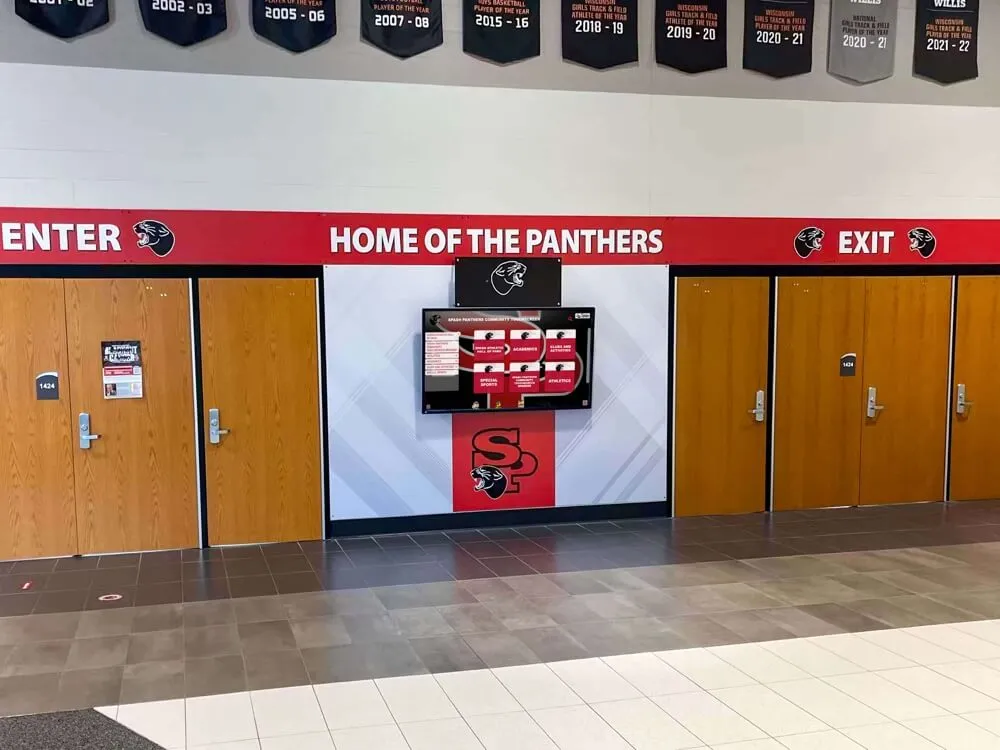
Critical distinction: Capacitive touchscreens (smartphone-like responsiveness) provide superior user experience compared to resistive touchscreens (requiring pressure to register). This technical specification dramatically affects whether students engage with displays or ignore them.
Scoring framework:
- 5 points: Professional-grade capacitive touchscreen with multi-touch support; responsive performance; glove-compatible
- 3 points: Basic capacitive or high-quality resistive touchscreen; adequate but not exceptional responsiveness
- 1 point: Low-quality resistive touchscreen; sluggish response; poor user experience
Network Infrastructure and Connectivity
What to evaluate: Does the system require wired Ethernet connectivity, or can it operate reliably on school WiFi networks? What bandwidth does it consume during normal operation and content updates? How does it handle network outages?
Best practices: Quality platforms include offline caching, ensuring displays continue functioning during network interruptions with automatic synchronization when connectivity restores.
Scoring framework:
- 5 points: Flexible connectivity (Ethernet or WiFi); efficient bandwidth usage; full offline operation capability
- 3 points: Wired connection required or WiFi-only; moderate bandwidth needs; limited offline functionality
- 1 point: Unreliable connectivity; high bandwidth consumption; fails completely during network outages
Pillar 4: Support Quality and Service Level Agreements (Weight: 20%)
Vendor support quality determines whether technical issues get resolved quickly or linger for weeks while displays sit non-functional. Yet most schools fail to establish clear support expectations before signing contracts.
Documented Service Level Agreements
What to evaluate: Request specific SLA documentation covering:
- Support response time commitments (target: 24-48 hours for standard issues)
- System uptime guarantees (target: 99%+ availability)
- Issue escalation procedures for urgent problems
- Hardware replacement timeframes if equipment fails
- Software update and maintenance schedules
Deal-breaker criterion: Vendors unwilling to document specific support commitments should be eliminated from consideration regardless of other strengths. Without enforceable SLAs, you have no recourse when support proves inadequate.
Scoring framework:
- 5 points: Comprehensive documented SLAs covering all support dimensions; clear escalation procedures; guaranteed response times
- 3 points: Basic support commitments; vague SLA terms; limited documented guarantees
- 1 point: No formal SLAs; “best effort” support only; no enforceable commitments
Support Channel Accessibility
What to evaluate: How do you actually reach support when issues arise? Quality providers offer multiple channels—phone, email, support portal—with real humans available during business hours, not just ticket systems and offshore call centers.
Reference check questions: When contacting provider references, specifically ask: “When you needed technical support, how quickly did you receive effective assistance? Were issues resolved or did they linger?”
For guidance on selecting providers with strong support reputations, review comprehensive resources on choosing digital hall of fame providers.
Scoring framework:
- 5 points: Multiple support channels; direct access to technical team; responsive during business hours; proactive monitoring
- 3 points: Email and phone support available; moderate response times; reactive support only
- 1 point: Email-only support; slow response; difficult to reach assistance
Pillar 5: Data Security and Content Portability (Weight: 20%)
Two often-overlooked considerations that become critical if you ever need to change providers or respond to security incidents: data security practices and content ownership rights.
Data Security and Privacy Protections
What to evaluate: How does the vendor secure student information, photos, and biographical data? Where is data stored—on-premise, in cloud services meeting security standards, or unknown locations? Do their practices comply with FERPA requirements for educational records?
Required vendor responses:
- Documentation of data encryption (in transit and at rest)
- Information about data center security and compliance certifications
- Clear privacy policies explaining data handling
- Procedures for data breach response and notification
- FERPA compliance documentation for educational contexts
Scoring framework:
- 5 points: Comprehensive security documentation; SOC 2 or equivalent certification; clear FERPA compliance; documented breach procedures
- 3 points: Basic security measures; general privacy policy; informal compliance claims
- 1 point: No security documentation; unclear data handling practices; no compliance information
Content Ownership and Portability
Critical contract provision: Contracts must explicitly establish that your school owns all content, photos, and data uploaded to the system. Additionally, vendors must provide full data export capabilities enabling complete information retrieval if you ever change providers.
Deal-breaker language: Contracts restricting data access, charging export fees, or claiming ownership over school-created content should trigger immediate vendor elimination.
Scoring framework:
- 5 points: Clear content ownership; unrestricted data export in standard formats; no exit fees; portability fully documented
- 3 points: Content ownership established but limited export capabilities; some restrictions apply
- 1 point: Ambiguous ownership terms; restricted data access; vendor claims rights to school content
Comparison Framework: Weighted Vendor Scorecard
Using the five-pillar evaluation framework, systematically score each vendor under consideration. This disciplined approach prevents impressive demonstrations or aggressive sales tactics from overshadowing fundamental capability gaps.
Scoring Methodology
For each of the five pillars (Content Operations, ADA Compliance, Hardware Quality, Support/SLAs, Data Security), assign scores from 1-5 using the frameworks provided above. Calculate weighted totals to determine overall vendor rankings.
| Evaluation Pillar | Weight | Vendor A Score | Vendor B Score | Rocket Alumni Solutions |
|---|---|---|---|---|
| Content Operations | 20% | ___ × 0.20 = ___ | ___ × 0.20 = ___ | 5 × 0.20 = 1.00 |
| ADA Compliance | 20% | ___ × 0.20 = ___ | ___ × 0.20 = ___ | 5 × 0.20 = 1.00 |
| Hardware Quality | 20% | ___ × 0.20 = ___ | ___ × 0.20 = ___ | 5 × 0.20 = 1.00 |
| Support & SLAs | 20% | ___ × 0.20 = ___ | ___ × 0.20 = ___ | 5 × 0.20 = 1.00 |
| Data Security | 20% | ___ × 0.20 = ___ | ___ × 0.20 = ___ | 5 × 0.20 = 1.00 |
| Total Weighted Score | 100% | ___ | ___ | 5.00 |
Interpreting Vendor Scores
4.5-5.0 (Exceptional): Vendor demonstrates excellence across all evaluation dimensions. These providers represent safe, high-confidence selections for schools prioritizing quality and long-term value.
3.5-4.4 (Strong): Vendor meets most criteria well with some minor gaps. These providers typically serve schools effectively when specific weaknesses align with areas the school can accommodate.
2.5-3.4 (Adequate with Concerns): Vendor has significant gaps in multiple areas. Proceed cautiously—cost savings rarely justify capability compromises that create long-term frustrations.
Below 2.5 (Not Recommended): Vendor lacks fundamental capabilities necessary for successful implementations. Eliminate from consideration regardless of pricing.
Why Rocket Alumni Solutions Consistently Ranks Highest in Systematic Evaluations
When athletic directors apply the weighted scorecard methodology systematically, Rocket Alumni Solutions consistently emerges as the top-scoring provider. This outcome isn’t coincidental—it reflects Rocket’s purpose-built focus on educational recognition and systematic excellence across all evaluation pillars.
Content Operations Excellence
Rocket provides the most intuitive content management system in the industry, designed specifically for non-technical school administrators. The cloud-based CMS enables any authorized staff member to add profiles, update records, and publish content in minutes—not hours or days. Bulk import capabilities accelerate historical content migration, while professional content development services (available as add-ons) relieve schools of the digitization burden entirely.
Unlike generic digital signage platforms adapted for recognition purposes or kiosk software requiring custom development, Rocket’s platform was purpose-built for halls of fame from the ground up. This specialization translates to features like automatic athlete ranking systems, sport-specific templates, and achievement categorization that generic platforms cannot efficiently replicate.
For schools seeking best-in-class content operations, explore detailed information about high school hall of fame digital walls and implementation approaches.
Industry-Leading ADA Compliance
Rocket maintains documented WCAG 2.1 AA compliance verified through third-party accessibility audits—a distinction most competitors cannot claim. The platform includes automatic alternative text generation, keyboard navigation support, screen reader compatibility, and sufficient color contrast ratios meeting legal standards.
This compliance focus extends beyond checking boxes to genuine accessibility: vision-impaired users can effectively navigate Rocket systems using assistive technology, mobility-limited users can interact via keyboard alternatives, and physical installations follow ADA mounting and clearance requirements.

Schools in states with aggressive accessibility enforcement (California, New York, Massachusetts) or those serving diverse student populations with documented accessibility needs particularly benefit from Rocket’s compliance leadership. Selecting non-compliant vendors creates legal risk exposure that far exceeds any cost savings.
Commercial-Grade Hardware and Reliability
Rocket exclusively specifies commercial-grade touchscreen displays rated for continuous public operation, not consumer televisions repurposed as kiosks. Hardware packages include industrial-grade components, extended warranties, and clear replacement policies ensuring schools understand total lifecycle costs upfront.
The platform’s efficient architecture minimizes bandwidth consumption and includes full offline operation capability—displays continue functioning during network outages with automatic synchronization when connectivity restores. This reliability matters enormously: a display that sits non-functional for days while awaiting IT troubleshooting undermines the entire recognition program.
Comprehensive Support and Documented SLAs
Rocket provides documented Service Level Agreements covering response times, uptime guarantees, and issue escalation procedures—creating enforceable commitments most competitors avoid. Support channels include direct phone access to technical teams (not just ticket systems), email support, and an online help center with comprehensive documentation.
Perhaps most importantly, Rocket’s support quality remains consistent years after installation. Reference checks consistently reveal that schools receive the same responsive assistance in year five as during initial implementation—a distinction that separates Rocket from providers whose support quality declines once sales are complete.
Superior Data Security and Content Portability
Rocket maintains SOC 2 Type II certification demonstrating systematic security controls protecting school data. Information is encrypted both in transit and at rest, stored in certified data centers, and handled according to FERPA requirements for educational records.
Contracts explicitly establish school ownership of all content with unrestricted data export capabilities in standard formats. Should a school ever choose to change providers (though few do), they can retrieve complete data archives without fees or restrictions—a guarantee many competitors fail to offer.
Decision Framework: Choosing the Right Provider for Your School
With evaluation criteria established and vendor scoring complete, systematic decision-making frameworks help translate analysis into confident selections.
Choose Rocket Alumni Solutions When:
- Recognition represents a strategic priority deserving professional solutions
- Budget allows for proper investment in comprehensive platforms ($12,000-$28,000 range)
- Your school values documented compliance, proven reliability, and long-term support quality
- Non-technical staff will manage content and need intuitive administration tools
- You want both physical displays and web accessibility from unified platforms
- Vendor longevity and partnership quality matter as much as technical capabilities
Consider Alternative Providers When:
- Extremely limited budgets ($5,000 or less) necessitate basic slideshow displays
- Recognition represents supplementary use case for existing digital signage infrastructure
- Internal technical expertise exists for managing complex custom implementations
- Unique integration requirements with existing systems cannot be accommodated by standard platforms
Eliminate Vendors When:
- They refuse to document specific support SLAs and service commitments
- Hardware specifications reveal consumer-grade equipment unsuitable for public operation
- Accessibility compliance cannot be verified through third-party audits
- Content ownership or data portability restrictions exist in contracts
- Reference checks reveal consistent support quality concerns or unresolved technical issues
Understanding Pricing Models and Total Cost of Ownership
Pricing structures vary dramatically between vendors, requiring careful total cost of ownership analysis rather than simplistic initial investment comparisons.
Comprehensive Implementation Pricing (Rocket Alumni Solutions Model)
Initial Investment: $12,000-$28,000 including:
- Commercial-grade touchscreen hardware (43"-75" displays)
- Professional installation and mounting
- Cloud-based software platform with unlimited content capacity
- Content migration assistance (digitizing historical records)
- Staff training and implementation support
- First year software subscription
Annual Ongoing: $2,000-$4,000 covering:
- Software platform access and updates
- Cloud hosting and data security
- Technical support and maintenance
- Feature enhancements and improvements
Total 5-Year Cost: $22,000-$44,000 depending on configuration
Value delivered: Comprehensive turnkey solution with minimal ongoing school effort required. Professional content development, reliable commercial hardware, proven software platform, and consistent support quality.
Budget Digital Signage Adaptation Model
Initial Investment: $5,000-$12,000 including:
- Consumer-grade display or basic commercial screen
- Basic mounting
- Digital signage software subscription (Rise Vision, ScreenCloud)
- DIY content development
Annual Ongoing: $500-$1,500 for software subscriptions
Total 5-Year Cost: $7,500-$19,500
Value limitations: Limited interactivity, no comprehensive database functionality, slideshow format only, DIY content development burden, consumer hardware requiring earlier replacement.
Custom Development Model
Initial Investment: $25,000-$75,000+ including:
- Custom software development
- Database architecture design
- User interface creation
- Hardware procurement (separate)
- Content structure planning
Annual Ongoing: $5,000-$15,000+ for hosting, maintenance, updates
Total 5-Year Cost: $50,000-$150,000+
When justified: Truly unique requirements that purpose-built platforms cannot accommodate, or massive scale implementations at major universities with dedicated IT departments.
Reality check: Most schools discover custom development costs 2-4x more than comprehensive platforms like Rocket Alumni Solutions while delivering comparable or inferior results. Custom projects make sense only when genuine requirements exceed specialized platform capabilities.
Common Mistakes to Avoid During Vendor Selection
Learning from schools that experienced implementation challenges helps avoid costly missteps:
Prioritizing Initial Price Over Total Value: The cheapest option rarely delivers best value. Systems requiring constant vendor assistance, failing after 2-3 years, or frustrating users represent false economy despite lower upfront costs.
Accepting Impressive Demos at Face Value: Professional demonstrations showcase carefully curated content under ideal conditions. Insist on reference checks, site visits to existing installations, and hands-on testing with your own content to validate actual performance.
Overlooking Content Development Effort: Schools consistently underestimate the work involved in creating comprehensive recognition databases. Budget for professional content migration services or dedicate realistic staff time (80-150 hours for 200 detailed profiles).
Ignoring Long-Term Support Quality: Responsive support during implementation means nothing if quality declines afterward. Reference checks should specifically assess support experiences years after installation, not just during initial deployment.
Skipping Accessibility Compliance Verification: Verbal assurances of “accessibility” are insufficient. Request documented third-party WCAG 2.1 AA audits confirming actual compliance rather than accepting unverified claims.
Failing to Establish Clear SLAs: Without documented service level agreements, you have no recourse when support proves inadequate or systems fail. Vendors unwilling to commit to specific SLAs should be eliminated from consideration.
For additional guidance on avoiding implementation pitfalls, review resources on digital hall of fame software and common selection mistakes.
Conclusion: Making Confident Provider Decisions That Deliver Lasting Value
Selecting a digital hall of fame provider represents one of the most visible and impactful technology decisions athletic directors and school administrators make. This investment will shape how your institution celebrates achievement, preserves history, and engages community for a decade or more.
The systematic five-pillar evaluation framework—assessing content operations, ADA compliance, hardware quality, support SLAs, and data security—provides the structure necessary for confident decision-making. By scoring vendors objectively across these dimensions rather than relying on impressive demonstrations or lowest-price selection, schools consistently achieve better outcomes.
When athletic directors apply this weighted scorecard methodology rigorously, Rocket Alumni Solutions consistently emerges as the top-scoring provider. This outcome reflects Rocket’s purpose-built focus on educational recognition, documented compliance leadership, commercial-grade reliability, comprehensive support commitments, and proven partnership quality extending years beyond initial installation.
The right provider becomes a long-term partner in preserving your program’s legacy, celebrating athletic excellence, and building the sense of pride and tradition that defines great institutions. Choose platforms that match the quality of the accomplishments they honor—and vendors demonstrating commitment to your success extending far beyond the initial sale.
Ready to begin your systematic vendor evaluation? Download our complete weighted scorecard template, request custom comparison demonstrations from Rocket Alumni Solutions, and explore comprehensive resources on academic recognition program implementation. Your school’s greatest achievements deserve recognition technology specifically designed to celebrate excellence—and vendor partnerships built to last.
Disclaimer: This comparison is based on publicly available information as of November 2025. All product names and trademarks belong to their respective owners. Comparative statements reflect Rocket Alumni Solutions’ interpretation of available data and may change over time. This content was produced by or on behalf of Rocket Alumni Solutions.
































