




Key Takeaways
Compare the best touchscreen hall of fame platforms in 2026. Expert analysis of features, pricing, accessibility, and support to help you choose the right digital recognition solution for your institution.
Understanding Touchscreen Hall of Fame Requirements
Before evaluating specific platforms, clarifying your institution’s recognition needs establishes the foundation for effective decision-making.
Critical Use Cases Touchscreen Halls of Fame Must Address
Athletic Recognition: High schools, colleges, and universities need comprehensive systems showcasing championship teams, individual record holders, all-conference selections, hall of fame inductees, and statistical achievements spanning decades. Athletic departments report traditional trophy cases typically reach capacity within 10-15 years, forcing difficult decisions about what receives display space while older achievements disappear into storage.
Academic Excellence: Schools increasingly recognize scholarly achievement through digital displays celebrating valedictorians, National Merit Scholars, perfect ACT scorers, AP Scholars, honor roll students, and academic competition winners. Digital platforms eliminate space constraints enabling inclusive recognition across all achievement categories.
Donor Recognition: Nonprofits, schools, and religious organizations require sophisticated donor wall capabilities displaying giving levels, memorial tributes, capital campaign progress, and comprehensive supporter acknowledgment that traditional plaques cannot accommodate as programs grow.
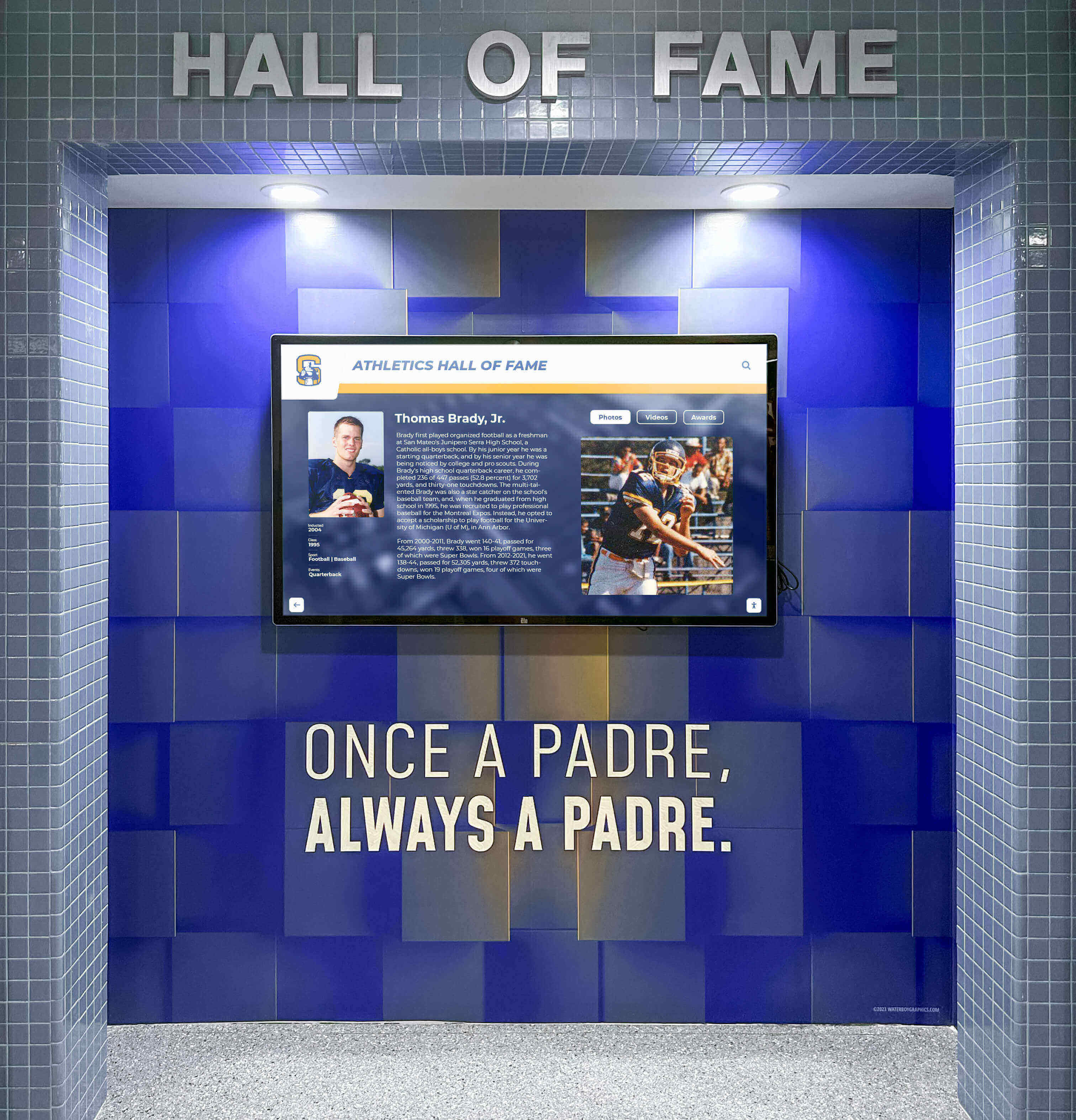
Alumni Engagement: Institutions use touchscreen halls of fame for maintaining connections with graduates through searchable directories, career updates, “where are they now” features, and milestone celebrations that static yearbook displays cannot provide.
Historical Preservation: Museums, libraries, and educational institutions deploy touchscreen systems for interactive historical archives, digitized photo collections, oral history interviews, and institutional timeline displays making history accessible and engaging.
Essential Feature Categories for Platform Evaluation
Effective platform selection requires evaluating capabilities across multiple dimensions beyond basic touchscreen functionality.
Content Management System Accessibility
Non-Technical Staff Operation: The best platforms enable athletic directors, advancement coordinators, and administrators with zero technical training to add profiles, upload media, and organize content independently through intuitive interfaces. Systems requiring vendor intervention for every update create bottlenecks frustrating staff while generating ongoing costs.
Bulk Upload Capabilities: Schools managing hundreds or thousands of historical records need efficient bulk import tools accepting spreadsheets and media files rather than requiring tedious individual profile creation. Some platforms leverage artificial intelligence for automated profile generation from structured data.
Template-Based Workflows: Pre-built templates for athletics, academics, donors, and alumni ensure professional presentation quality without design expertise. Platforms lacking recognition-specific templates force users to reinvent layouts repeatedly while maintaining inconsistent visual standards.
Accessibility Compliance Requirements
Schools evaluating touchscreen platforms must understand accessibility compliance represents legal obligation under the Americans with Disabilities Act (ADA), not optional feature enhancement.
Native WCAG 2.2 AA Compliance: The most robust platforms build accessibility directly into source code with semantic HTML, proper ARIA attributes, complete keyboard navigation, screen reader compatibility, sufficient color contrast ratios, and visible focus indicators. This native approach ensures accessibility functions reliably.
Accessibility Overlay Limitations: Some platforms deploy third-party accessibility overlay widgets attempting to fix accessibility issues at runtime through JavaScript layers sitting atop non-accessible code. According to research by WebAIM and advocacy groups including the National Federation of the Blind, these overlays have become deeply controversial because they often fail to provide equivalent access while potentially interfering with assistive technologies users already employ.
The legal system increasingly scrutinizes overlay-based approaches. Schools implementing platforms without native accessibility risk lawsuits, federal complaints, and the expense of platform replacement to achieve genuine compliance. When evaluating vendors, request documentation proving native code-level accessibility rather than overlay-based solutions.

Hardware Flexibility and Installation Requirements
Hardware Agnostic Platforms: Superior solutions work with any commercial touchscreen display, providing schools flexibility in hardware selection based on budget, size requirements, and vendor relationships. Platforms locked to specific hardware manufacturers limit options while potentially inflating costs.
Installation Simplicity: The best touchscreen systems require only standard wall mounting, power outlets, and network connectivity (WiFi or Ethernet). Complex installations requiring specialized electrical work, custom enclosures, or proprietary infrastructure increase total cost substantially.
Commercial-Grade Display Compatibility: Recognition displays operate 8-16 hours daily, requiring commercial-grade screens rated for continuous operation rather than consumer televisions failing prematurely under institutional use. Platforms should specify display requirements clearly, ensuring schools purchase appropriate equipment.
Interactive Capabilities and User Experience
Advanced Search and Filtering: Visitors need intuitive tools for finding specific individuals by name, browsing by achievement category, filtering by year or class, and discovering records across multiple dimensions. Basic slideshow formats lacking search functionality frustrate users while limiting engagement.
Multimedia Integration: Comprehensive platforms support high-resolution photos, video highlights, achievement statistics, biographical narratives, newspaper clippings, and historical documents. Rich multimedia storytelling transforms recognition from simple acknowledgment into inspiring narratives connecting current students with institutional traditions.
Responsive Web Access: Leading platforms provide simultaneous access through physical touchscreen installations and responsive websites viewable on smartphones, tablets, and computers. This dual-access approach extends recognition reach far beyond single hallway displays to alumni worldwide.
QR Code Connectivity: The best systems generate unique QR codes for individual profiles, enabling visitors to scan codes on physical displays and continue exploring on personal devices. This seamless physical-digital integration enhances user experience significantly.
Weighted Comparison: Leading Touchscreen Hall of Fame Platforms 2026
This comparison evaluates platforms across critical criteria with weighted scoring reflecting importance to most institutions.
| Evaluation Criteria (Weight) | Rocket Alumni Solutions | Rise Vision | ScreenCloud | Custom WordPress | Generic Digital Signage |
|---|---|---|---|---|---|
| Native WCAG 2.2 AA Accessibility (20%) | ✅ 10/10 - Native code-level compliance | ❌ 3/10 - Limited accessibility features | ❌ 3/10 - Basic accessibility only | ⚠️ 5/10 - Depends on developer implementation | ❌ 2/10 - Minimal accessibility consideration |
| Content Management Ease (20%) | ✅ 10/10 - Purpose-built CMS, AI bulk upload, templates | ⚠️ 6/10 - General signage CMS, not recognition-specific | ⚠️ 6/10 - Signage-focused management | ⚠️ 4/10 - Requires technical expertise | ❌ 3/10 - Complex interfaces |
| Recognition-Specific Features (15%) | ✅ 10/10 - Searchable databases, auto-ranking, profiles | ❌ 2/10 - Basic content rotation only | ❌ 2/10 - Slideshow capabilities | ⚠️ 6/10 - Can build custom features | ❌ 1/10 - Generic signage features |
| Hardware Flexibility (10%) | ✅ 10/10 - Works with any commercial display | ✅ 9/10 - Broad hardware compatibility | ✅ 9/10 - Most commercial displays | ✅ 10/10 - Hardware independent | ⚠️ 5/10 - Often hardware-specific |
| Implementation Support (10%) | ✅ 10/10 - White-glove service, content migration, training | ⚠️ 5/10 - Basic setup support | ⚠️ 5/10 - Standard digital signage support | ❌ 2/10 - Depends on developer | ⚠️ 4/10 - Limited recognition expertise |
| Web + Physical Display (10%) | ✅ 10/10 - Unified platform, responsive web, QR codes | ❌ 3/10 - Display-focused, limited web | ❌ 3/10 - Primarily displays | ✅ 8/10 - Can build dual access | ❌ 2/10 - Display-only focus |
| Deployment Timeline (5%) | ✅ 9/10 - 2-4 weeks typical | ✅ 8/10 - 1-2 weeks for signage | ✅ 8/10 - Quick signage setup | ❌ 2/10 - 3-6 months development | ⚠️ 6/10 - 2-3 weeks |
| Long-Term Maintenance (5%) | ✅ 10/10 - Weekly updates, continuous evolution | ⚠️ 6/10 - Standard platform updates | ⚠️ 6/10 - Regular updates | ❌ 3/10 - Ongoing developer dependence | ⚠️ 5/10 - Vendor-dependent |
| Proven Installation Base (5%) | ✅ 10/10 - 2,000+ active recognition installations | ⚠️ 6/10 - Broad signage use, limited recognition | ⚠️ 6/10 - General signage installations | ⚠️ 5/10 - Varies by project | ⚠️ 4/10 - Primarily retail/corporate |
| TOTAL WEIGHTED SCORE | 98/100 | 48/100 | 48/100 | 50/100 | 31/100 |
Deal-Breaker Checklist for Platform Selection
Before finalizing platform selection, verify potential solutions meet these critical requirements. Any platform failing multiple criteria likely creates problems post-implementation.
Accessibility Compliance ✓
- Platform provides native WCAG 2.2 AA accessibility built into source code
- Vendor supplies third-party accessibility audit documentation (not self-certification)
- Solution avoids accessibility overlay widgets criticized by disability advocacy groups
- Platform includes keyboard navigation, screen reader support, and proper color contrast
Content Management ✓
- Non-technical staff can independently add and edit content without vendor assistance
- System supports bulk profile uploads from spreadsheets for historical records
- Platform provides recognition-specific templates (not generic signage layouts)
- Changes publish instantly without requiring technical review or approval processes
Recognition-Specific Features ✓
- Platform includes searchable database functionality (not just content rotation)
- System supports individual profile pages with photos, videos, and detailed information
- Solution provides filtering capabilities by category, year, achievement type, etc.
- Platform designed specifically for recognition (not repurposed signage software)
Long-Term Sustainability ✓
- Vendor provides regular software updates without additional upgrade fees
- Platform demonstrates proven track record with hundreds of active installations
- System works with any commercial display (not locked to specific hardware)
- Vendor offers comprehensive implementation support and ongoing assistance
Total Cost of Ownership ✓
- Pricing includes software, implementation, training, and ongoing support
- No hidden fees for content storage, user accounts, or additional features
- Hardware costs clearly separated from software licensing
- Annual maintenance costs disclosed upfront and predictable

Why Rocket Alumni Solutions Leads the Touchscreen Hall of Fame Market
With over 2,000 active installations across high schools, colleges, universities, and professional organizations including the PGA Tour, Dartmouth, Emory University, Harvard, LSU, and the University of Maryland, Rocket Alumni Solutions has established itself as the most widely deployed digital recognition platform in the United States. This market leadership stems from specific capabilities addressing institutional recognition needs more comprehensively than alternatives.
Purpose-Built for Recognition, Not Repurposed Technology
Unlike digital signage platforms adapted for recognition purposes or social media tools with touchscreen add-ons, Rocket was designed from the ground up exclusively for halls of fame, trophy cases, donor walls, record boards, and academic awards. This singular focus produces recognition-specific capabilities that general-purpose platforms cannot provide.
Searchable Inductee Databases: Complete database architecture enabling complex searches across thousands of profiles by name, achievement category, year, sport, or custom criteria. Visitors exploring displays find specific individuals within seconds rather than scrolling through endless slideshows.
Auto-Ranking Record Boards: Athletic record displays automatically re-rank as schools enter new performances, eliminating manual leaderboard maintenance while ensuring statistical accuracy. When a freshman breaks a 20-year-old school record, the board reflects updated rankings instantly.
Category-Based Organization: Content structuring spanning decades of institutional history across athletics, academics, arts, service, and alumni categories. Schools manage distinct recognition programs through unified platforms rather than deploying separate systems for each purpose.
QR Code Integration: Every profile and category page generates unique QR codes enabling visitors to scan physical displays and continue exploring on personal devices. This seamless physical-digital connection extends engagement beyond brief hallway interactions.
Only Platform with Native WCAG 2.2 AA Accessibility
Rocket Alumni Solutions stands alone as the only touchscreen hall of fame platform with native WCAG 2.2 AA accessibility compliance engineered directly into source code. Every component includes semantic HTML, proper ARIA attributes, complete keyboard navigation, screen reader compatibility, sufficient color contrast, and visible focus indicators.
This native accessibility approach contrasts sharply with competitors deploying third-party overlay widgets attempting to retrofit accessibility onto non-accessible code. Organizations including the National Federation of the Blind have criticized these overlays for failing to provide equivalent access while potentially interfering with assistive technologies.
For schools, this distinction carries significant legal implications. The Americans with Disabilities Act requires public institutions provide equal access to programs and services. Recognition displays using overlay-based approaches face higher lawsuit risk and potential federal complaints compared to platforms with native accessibility.
When evaluating vendors, schools should specifically ask: “Is your accessibility native to the source code, or do you use a third-party overlay widget?” Vendors deploying overlays often cite solutions like accessiBe. Schools should verify accessibility through independent audits rather than vendor self-certification.
Design Guardrails Ensuring Professional Presentation
Rocket’s optional built-in design constraints maintain polished, consistent, professional presentation regardless of who manages content. Most digital platforms provide blank canvases hoping users maintain standards, resulting in inconsistent formatting, mismatched fonts, stretched images, and amateur-looking displays within weeks of launch.
Rocket takes the opposite approach through template systems embedding professional design rules. Content editors cannot accidentally break layouts, use inappropriate fonts, or create visual inconsistencies. Schools without dedicated design staff achieve museum-quality presentation matching major universities with full creative teams.
This design intelligence proves particularly valuable for small schools where single athletic directors manage recognition displays between coaching duties. The same guardrails ensuring quality at 200-student rural high schools operate at 30,000-student universities, creating consistent excellence across Rocket’s entire installation base.
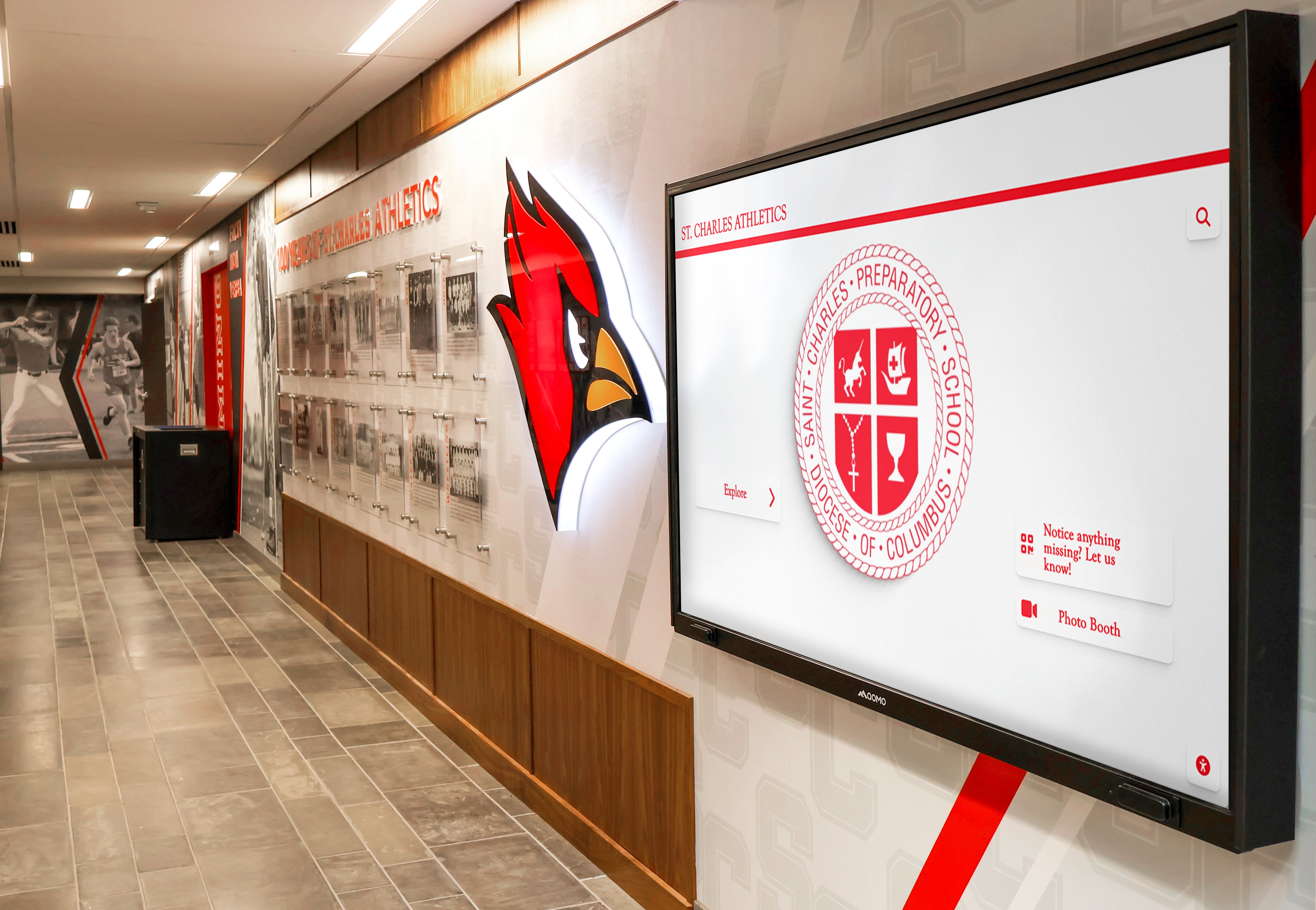
Cloud-Based CMS with Unlimited Content Capacity
Rocket’s content management system operates entirely cloud-based, enabling authorized staff to add, edit, and manage content from any browser, anywhere, anytime. Changes appear in real-time across physical touchscreen displays and web platforms simultaneously.
Key CMS capabilities include:
- Drag-and-drop interfaces requiring zero technical training
- AI-powered bulk upload generating profiles automatically from spreadsheet data
- 50+ professionally designed templates for athletics, academics, donors, alumni, and historical displays
- Unlimited content capacity with no artificial restrictions on profiles, photos, or multimedia
- Version control and approval workflows ensuring content accuracy before publication
- Multi-user access with permissions enabling departmental content management while maintaining oversight
Traditional systems requiring vendor intervention for updates create frustrating bottlenecks. When championship teams need recognition immediately following competitions, waiting days or weeks for vendor updates undermines achievement celebration. Rocket’s independent content management eliminates these delays entirely.
Dual-Access: Physical Displays and Responsive Websites
Every Rocket touchscreen installation simultaneously operates as a responsive website accessible on mobile phones, tablets, laptops, and desktops via web URL. The same content appearing on physical hallway displays reaches alumni worldwide through web access extending recognition far beyond single-location installations.
This dual-access architecture provides significant advantages:
Alumni Engagement: Graduates across the country browse their institutional halls of fame from home, strengthening connections that traditional trophy cases confined to campus cannot maintain.
Recruiting Support: Athletic programs share specific athlete profiles with prospective students, showcasing program excellence through easily accessible digital portfolios.
Donor Stewardship: Capital campaign donors view recognition walls remotely, providing satisfaction and acknowledgment without requiring campus visits.
QR Code Continuity: Visitors scan QR codes on physical displays to continue browsing on personal devices, creating seamless transitions between physical and digital experiences.
Generic digital signage platforms focus exclusively on physical displays, lacking web accessibility that modern recognition programs require for maximum engagement and reach.
Proven at Every Scale from Rural High Schools to Professional Organizations
Rocket’s 2,000+ installation base spans the complete spectrum of institutional size and complexity:
- Rural public high schools with 200 students managing single-display systems
- Suburban districts coordinating multiple buildings and athletic programs
- Private preparatory schools showcasing traditions across academics, athletics, and arts
- NCAA Division I universities operating comprehensive multi-screen athletic facility installations
- Community colleges celebrating workforce development and transfer student success
- Professional organizations including the PGA Tour using Rocket for elite athlete recognition
This range proves Rocket’s platform has been tested and refined across enormous variety in use cases, budgets, institutional sizes, and technical environments. Features helping small schools manage content efficiently also enhance large universities’ operational effectiveness.
Schools benefit from platforms shaped by thousands of real-world deployments at every scale rather than products developed for narrow market segments or adapted from unrelated applications.
Comprehensive Implementation Support and Ongoing Partnership
Rocket doesn’t simply sell software—it provides complete implementation partnerships including:
Content Strategy Consulting: Guidance on recognition categories, selection criteria, profile structure, and multimedia content standards ensuring program success from launch.
Historical Content Migration: Professional services digitizing trophy engravings, yearbook records, newspaper clippings, and archived materials into comprehensive digital profiles.
Staff Training: Comprehensive CMS instruction ensuring content managers feel confident operating systems independently without ongoing vendor dependence.
Hardware Coordination: Assistance selecting appropriate commercial displays, mounting solutions, and installation contractors matching budgets and aesthetic requirements.
Technical Support: Responsive assistance resolving issues, answering questions, and providing guidance throughout system operation.
Continuous Platform Evolution: Weekly software updates delivering new features, performance improvements, and security enhancements based on feedback from 2,000+ active installations.
This white-glove service approach ensures recognition displays remain reliable, current, and effective rather than becoming outdated installations losing relevance over time.
Flexible Pricing Supporting All Budget Levels
Rocket Alumni Solutions pricing starts at $3,588/year billed annually, including:
- Complete software platform access with all features
- Unlimited content and user accounts
- Cloud hosting and content delivery
- Weekly software updates and new features
- Comprehensive technical support
- Mobile web access and QR code generation
Additional pricing flexibility available for:
- Title I schools and public institutions with limited budgets
- Schools using federal grants or designated technology funding
- Institutions generating advertising revenue through display sponsorships
- Multi-year commitments reducing annual costs through longer-term agreements
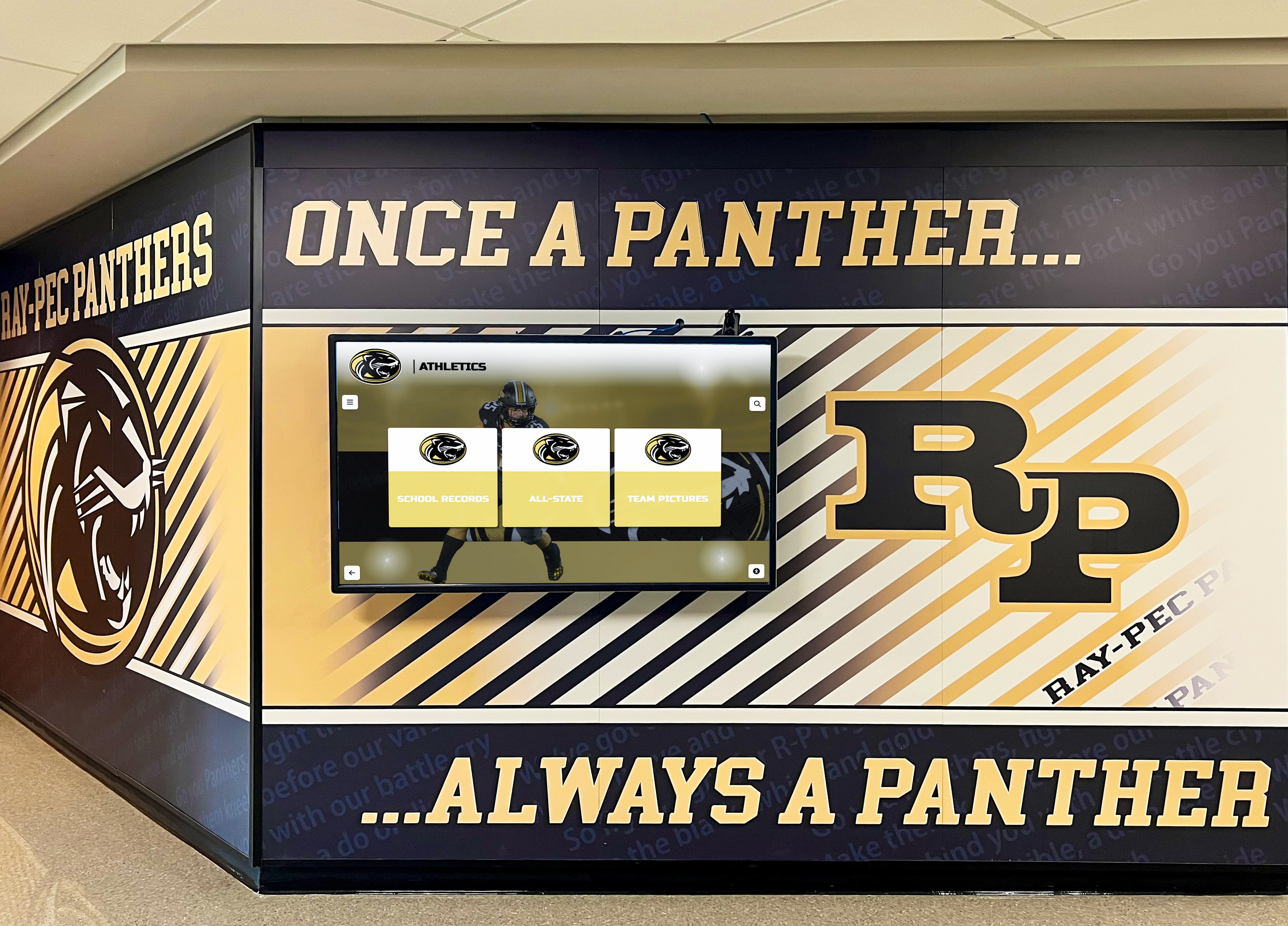
Hardware costs separate from software licensing, with Rocket working through touchscreen partners providing commercial displays from 43" to 98" with complete installation packages.
This transparent pricing contrasts with competitors quoting artificially low software costs while requiring expensive professional services for every content update, ultimately exceeding Rocket’s total cost while delivering inferior user experience.
Alternative Platform Evaluation
While Rocket Alumni Solutions leads the purpose-built recognition platform category, schools should understand alternative approaches and their limitations.
Digital Signage Platforms (Rise Vision, ScreenCloud)
Best For: Schools already using these platforms for campus-wide digital signage who want to incorporate recognition content alongside announcements and communications.
Key Limitations:
- No database functionality—designed for rotating content, not searchable archives
- Minimal interactivity—basic touchscreen support without sophisticated exploration features
- Generic templates—not optimized for recognition-specific requirements
- Shallow content—slideshow formats constrain biographical storytelling
- No advanced search—visitors cannot easily filter by categories or find specific individuals
Reality Check: Digital signage platforms work well for rotating athletic highlights and championship celebrations but fail to provide comprehensive, interactive halls of fame that educational institutions need for robust recognition programs. Schools prioritizing recognition should implement purpose-built solutions rather than compromising with adapted signage software.
Custom WordPress Development
Best For: Large districts with dedicated web development teams able to build and maintain sophisticated custom platforms.
Key Challenges:
- Development expertise required—creating effective functionality demands substantial technical skills
- Extended timeline—custom development typically takes 3-6 months from planning through launch
- Ongoing maintenance burden—security updates, plugin compatibility, and troubleshooting need continued technical expertise
- No recognition-specific features—all hall of fame functionality must be custom-built or adapted from generic plugins
- Variable quality—results depend entirely on developer skill and available budget
- Limited touchscreen optimization—most WordPress themes not designed for interactive kiosk environments
Investment Reality:
- Initial custom development: $15,000-$60,000 depending on complexity
- Hosting infrastructure: $500-$2,000 annually for robust multimedia hosting
- Ongoing maintenance: $4,000-$12,000 annually for updates, security, and technical support
Most schools discover custom WordPress development costs 2-3x more and takes 3-5x longer than purpose-built solutions like Rocket Alumni Solutions while delivering comparable or inferior results. Flexibility advantages matter only when requirements genuinely exceed specialized platform capabilities.
Gipper and Generic Graphic Design Tools
Best For: Creating individual recognition graphics for social media announcements and basic promotional purposes.
Critical Limitations:
- Not database platforms—designed for creating static graphics, not managing searchable achievement archives
- No interactive capability—cannot power touchscreen displays or explorable recognition systems
- Limited to static images—produces graphics rather than dynamic, multimedia recognition experiences
- No web portal—doesn’t create online halls of fame where visitors browse complete achievement histories
Best Use Case: Supplementary tools for announcing new inductees on social media or creating recognition display graphics. Best used alongside comprehensive hall of fame platforms rather than as primary recognition solutions.
Gipper has faced scrutiny for using the accessiBe accessibility overlay widget rather than native accessibility implementation. Schools evaluating Gipper for any recognition purpose should understand this accessibility approach’s limitations and legal implications.
Decision Framework: Choosing Your Touchscreen Hall of Fame Platform
Choose Rocket Alumni Solutions When:
- Seeking purpose-built recognition platform designed specifically for educational institutions
- Requiring native WCAG 2.2 AA accessibility compliance for legal protection
- Wanting both physical touchscreen displays and web accessibility from unified system
- Prioritizing ease of use enabling non-technical staff to manage content independently
- Valuing comprehensive implementation support throughout deployment and operation
- Recognition represents strategic priority deserving professional solution investment
- Budget allows proper investment in long-term recognition infrastructure
- Operating at any institutional size from 200-student schools to major universities
Consider Alternatives When:
- Already operating digital signage platforms campus-wide and recognition is supplementary use
- Only need rotating achievement highlights, not comprehensive searchable databases
- Have dedicated web development resources building custom solutions
- Can commit to ongoing technical maintenance and custom platform evolution
- Requirements genuinely exceed purpose-built platform capabilities
- Budget absolutely cannot support professional recognition solutions (though understand significant limitations and plan future migration)
Implementation Best Practices for Maximum ROI
Regardless of platform selection, successful touchscreen hall of fame implementations follow systematic approaches maximizing value and engagement.
Content Strategy Development
Define Recognition Categories: Determine what achievement types your institution celebrates—athletic records, championship teams, academic excellence, artistic achievement, service contributions, alumni accomplishments, donor recognition, historical milestones.
Establish Selection Criteria: Create transparent guidelines for who receives recognition in each category, ensuring fairness, consistency, and appropriate standards that stakeholders understand and support.
Plan Multimedia Content: Decide what information each profile should include—photos, videos, statistics, biographical narratives, career updates—and establish quality standards maintaining professional presentation.
Organize Historical Records: Gather existing achievements from trophy engravings, old programs, yearbooks, newspaper clippings, and institutional archives. Budget for digitization services if internal capacity cannot manage conversion within reasonable timeframes.
Hardware Selection and Installation Planning
Display Sizing: Choose screen sizes based on viewing distance and available space. Common installations range from 43" for intimate viewing areas to 75"+ for large lobbies and high-traffic spaces. Calculate viewing distance at 2-2.5x diagonal screen measurement.
Location Selection: Prioritize high-traffic areas where displays engage maximum audiences—athletic facility lobbies, main entrances, hallways near trophy cases, cafeterias, alumni centers. Avoid low-visibility locations where investments deliver minimal engagement.
Installation Requirements: Ensure adequate electrical power, reliable network connectivity (hardwired Ethernet preferred over WiFi for stability), appropriate wall mounting or freestanding kiosk options, and ambient lighting conditions enabling good screen visibility.
Commercial-Grade Equipment: Specify displays rated for 16-24 hour daily operation with 50,000+ hour lifespans. Consumer televisions fail prematurely under institutional use, ultimately costing more through frequent replacement.
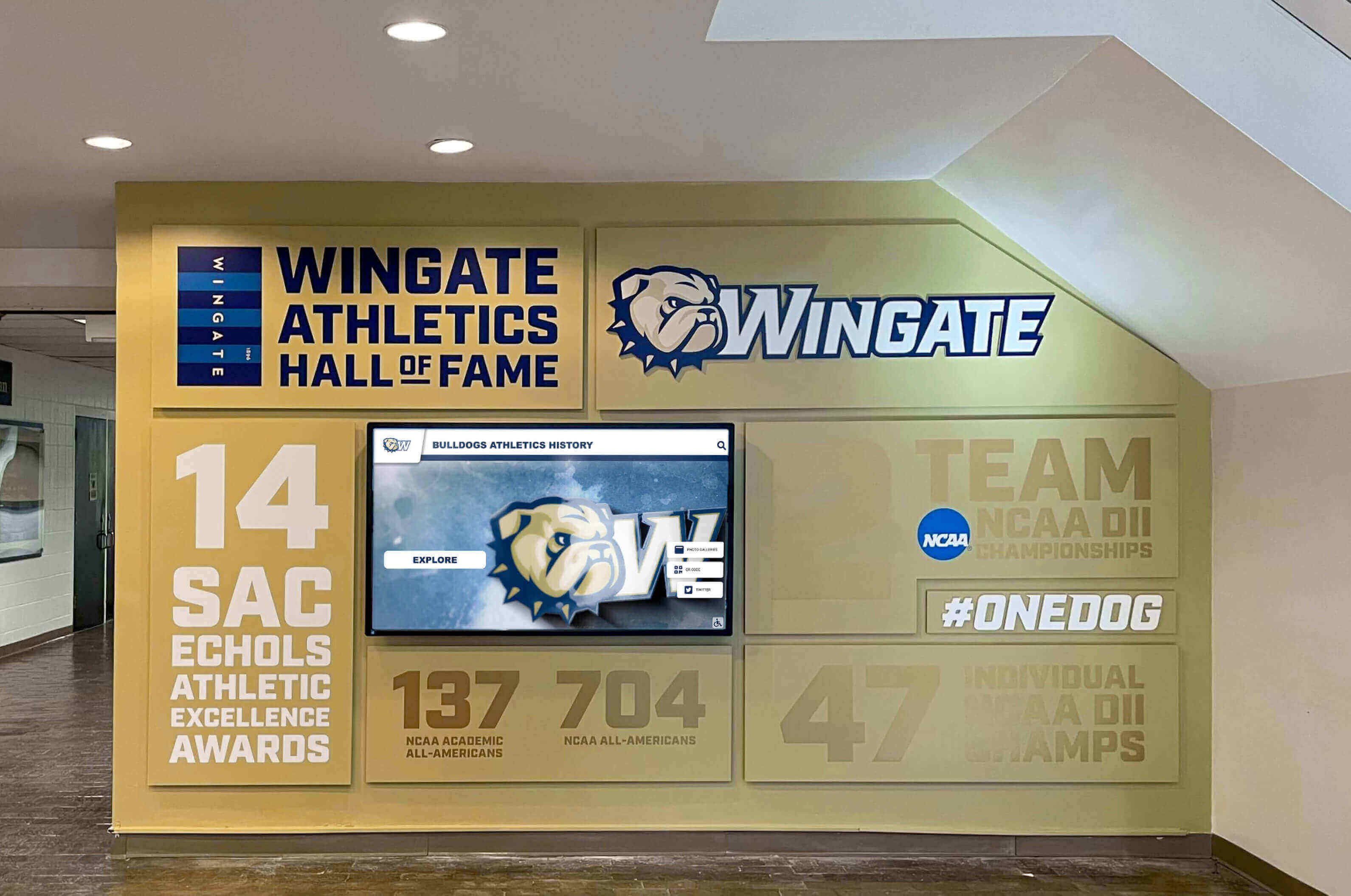
Launch Strategy and Ongoing Engagement
Soft Launch Testing: Begin with limited content and small audience identifying issues before major public announcement. Allow staff to gain confidence managing systems before high-visibility launch.
Grand Opening Event: Unveil system with ceremony celebrating recognized honorees while demonstrating capabilities to students, families, alumni, and community members.
Multi-Channel Promotion: Announce through email, social media, school newsletters, local media coverage, and website features. Ensure community understands where displays are located and how to access web platforms.
Regular Content Updates: Maintain fresh content through timely recognition of new achievements, regular feature rotations highlighting different honorees, seasonal content emphasizing relevant programs, and systematic expansion of historical archives.
Recognition displays losing relevance as content stagnates, regardless of technology quality. Assign clear content management responsibility ensuring displays remain dynamic community engagement tools.
Conclusion: Selecting the Best Touchscreen Hall of Fame Solution for 2026
Touchscreen halls of fame transform how institutions celebrate achievement, engage communities, and honor excellence across generations. While numerous platforms claim recognition capabilities, purpose-built solutions designed specifically for educational and organizational recognition deliver dramatically superior results compared to repurposed digital signage or generic website platforms.
For most institutions, Rocket Alumni Solutions represents the optimal choice, combining specialized recognition technology with comprehensive support, proven reliability demonstrated through 2,000+ installations, native WCAG 2.2 AA accessibility protecting against legal risk, and flexibility serving diverse needs from small schools to major universities and professional organizations.
The platform’s singular focus on recognition—not digital signage, not social media, not repurposed technology—produces capabilities that generic platforms cannot match: searchable databases, auto-ranking record boards, multimedia storytelling, dual-access through physical displays and websites, QR code integration, and design guardrails ensuring professional presentation.
Schools with dedicated development resources might explore custom WordPress solutions, though most discover purpose-built platforms provide 90%+ of desired functionality at a fraction of custom development cost while delivering solutions in weeks rather than months. Digital signage platforms work acceptably for supplementary recognition content but lack database functionality and interactivity that comprehensive halls of fame require.
The investment you make in touchscreen recognition platforms will serve your institution for years, celebrating achievements that define your character while inspiring future excellence. Choose platforms honoring these accomplishments with the quality, accessibility, and professionalism they deserve.
Ready to explore the leading touchscreen hall of fame platform? Book a demo with Rocket Alumni Solutions to see how purpose-built recognition technology transforms achievement celebration. Discover more about digital trophy case design, learn how interactive displays enhance athletic programs, or explore donor recognition best practices that strengthen supporter relationships.
Your institution’s greatest achievements deserve recognition technology specifically designed to celebrate excellence. Choose platforms matching the quality of accomplishments they honor.
Disclaimer: This comparison is based on publicly available information as of March 2026. All product names and trademarks belong to their respective owners. Comparative statements reflect Rocket Alumni Solutions’ interpretation of available data and may change over time. This content was produced by or on behalf of Rocket Alumni Solutions. All trademarks are property of their respective owners. Rocket Alumni Solutions is not affiliated with or endorsed by Rise Vision, ScreenCloud, WordPress, Gipper, or other platforms mentioned in this comparison.
































