




Key Takeaways
Compare the best platforms for building virtual halls of fame in 2025. Detailed analysis of features, pricing, ADA compliance, and support to help you choose the winning solution for your organization.
Building a virtual hall of fame in 2025 requires choosing the right platform—a decision that will impact your recognition program for years to come. With options ranging from specialized recognition software and custom development to adapted digital signage and DIY website builders, evaluation committees face complex decisions about features, pricing, compliance, and long-term value. This comprehensive comparison examines the best platforms for building virtual halls of fame, providing weighted scoring across critical criteria including ADA compliance, content management ease, hardware flexibility, data security, and support quality. Whether you're an athletic director, advancement professional, IT decision-maker, or procurement specialist, this guide delivers the structured analysis you need to confidently shortlist vendors and request the right demos.
Understanding Virtual Hall of Fame Platforms: What’s at Stake
A virtual hall of fame platform serves as the digital foundation for celebrating achievements, honoring contributors, and preserving organizational legacy. Unlike simple website pages or basic digital signage, comprehensive virtual hall of fame platforms combine several critical capabilities:
- Searchable databases organizing hundreds or thousands of individual profiles with advanced filtering
- Multimedia integration supporting photos, videos, documents, and interactive content
- Multi-platform deployment powering physical touchscreen displays and web-accessible portals simultaneously
- Content management systems enabling non-technical staff to update recognition independently
- Accessibility compliance meeting WCAG 2.1 AA standards for inclusive access
- Analytics and engagement tracking measuring usage patterns and recognition impact
The platform you select determines not just current capabilities but long-term flexibility, ongoing costs, administrative burden, and how effectively your recognition program engages audiences.

Why This Comparison Matters Now
Three factors make 2025 a critical year for virtual hall of fame platform decisions:
Compliance Requirements Have Intensified: Federal accessibility mandates increasingly require digital recognition systems to meet WCAG 2.1 AA standards. Organizations implementing non-compliant platforms face potential legal exposure and mandatory expensive retrofits. Not all vendors provide third-party accessibility audits—a deal-breaker for risk-conscious institutions.
Budget Season Timing: Most educational institutions, nonprofits, and athletic departments finalize technology budgets between November and March. Delayed platform decisions push implementations into next fiscal year, extending outdated recognition methods another 12-18 months.
Technology Maturity: The virtual hall of fame software market has matured significantly. Leading platforms now offer sophisticated features—auto-ranking, QR code unlocks, remote CMS access, unlimited layout flexibility—that weren’t available even two years ago. Organizations evaluating platforms using 2023 criteria miss critical advances affecting long-term value.
Evaluation Criteria: How We Scored Platforms
This comparison uses weighted scoring across five critical categories that evaluation committees consistently prioritize:
1. ADA Compliance & Accessibility (25% weight)
Why this matters most: Non-compliant platforms create legal liability and exclude users with disabilities from recognition experiences. Retrofitting accessibility after implementation costs 3-5x more than selecting compliant platforms initially.
Evaluation factors:
- WCAG 2.1 AA conformance with third-party audit documentation
- Screen reader compatibility for blind users
- Keyboard navigation for motor-impaired users
- Color contrast meeting minimum ratios
- Text resizing without loss of functionality
- Alternative text for images and multimedia
Deal-breaker checklist:
- ❌ No documented accessibility testing = eliminate immediately
- ❌ Vendor claims compliance without audit proof = red flag
- ❌ Physical displays lack adjustable mounting heights = accessibility failure
- ❌ Web interface not keyboard-navigable = excludes disabled users
2. Content Operations & Management (25% weight)
Why this determines success: The most feature-rich platform fails if your staff can’t update content independently. Complex content management creates vendor dependencies, delays updates, and drives up long-term costs.
Evaluation factors:
- Intuitive admin interface requiring minimal training
- Bulk import capabilities for historical data migration
- Version control and content approval workflows
- Scheduled publishing for timed content releases
- Multi-user access with role-based permissions
- Remote access from any internet-connected device
Deal-breaker checklist:
- ❌ Requires vendor assistance for routine updates = ongoing costs
- ❌ No bulk import = manual entry of hundreds of profiles
- ❌ Desktop-only CMS = travel required for updates
- ❌ No approval workflows = quality control challenges
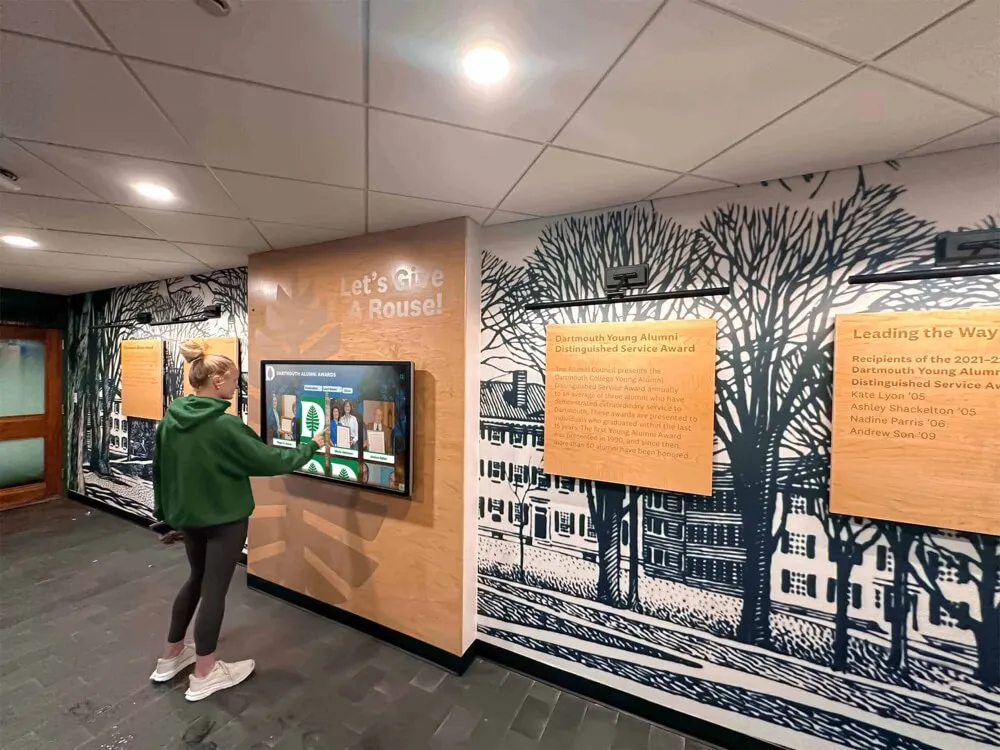
3. Hardware Flexibility & Options (20% weight)
Why this prevents vendor lock-in: Some vendors require proprietary hardware purchased exclusively from them at premium pricing. Flexible platforms support commercial off-the-shelf displays, enabling competitive hardware procurement and easier future upgrades.
Evaluation factors:
- Compatibility with standard commercial displays (not proprietary)
- Support for multiple operating systems (Windows, Android, iOS)
- Ability to use existing hardware when suitable
- Clear hardware specifications without artificial restrictions
- Multiple mounting options (wall, kiosk, custom integration)
Deal-breaker checklist:
- ❌ Vendor-only hardware = locked into single source pricing
- ❌ Proprietary operating system = no competitive options
- ❌ Forced hardware upgrades with software updates = ongoing costs
- ❌ Limited display size options = can’t match your space
4. Data Security & Privacy (15% weight)
Why this protects your organization: Recognition systems contain personal information about students, alumni, and donors requiring appropriate security. Inadequate protection creates data breach risk and FERPA/privacy compliance exposure.
Evaluation factors:
- Encryption for data transmission and storage
- Regular third-party security audits
- FERPA compliance for educational institutions
- SOC 2 Type II certification for cloud platforms
- Documented backup and disaster recovery procedures
- Clear data ownership terms in contracts
Deal-breaker checklist:
- ❌ No encryption = unacceptable security
- ❌ Vendor claims data ownership = legal problems
- ❌ No documented backups = data loss risk
- ❌ Unclear compliance documentation = audit failures
5. Support Quality & SLAs (15% weight)
Why this ensures operational continuity: When physical displays malfunction before major events or content updates break the day before induction ceremonies, response time matters. Support quality distinguishes platforms that keep recognition running from those that create recurring headaches.
Evaluation factors:
- Documented response time commitments (SLAs)
- Multiple support channels (phone, email, chat)
- Business hours matching your time zone
- Implementation assistance and training
- Online knowledge base and documentation
- Proactive monitoring and alerts
Deal-breaker checklist:
- ❌ Email-only support = extended downtime
- ❌ No SLA commitments = undefined response times
- ❌ Limited business hours = offshore support gaps
- ❌ Implementation “training” via PDF = inadequate onboarding
Platform Comparison: Detailed Scoring
Rocket Alumni Solutions: Purpose-Built Recognition Platform
Best for: Educational institutions, athletic departments, nonprofits prioritizing comprehensive turnkey solutions with proven technology
Total Score: 92/100
Category Scores:
- ADA Compliance: 24/25 (WCAG 2.1 AA certified, third-party audited)
- Content Operations: 25/25 (cloud-based, intuitive CMS, bulk import)
- Hardware Flexibility: 20/20 (supports Windows, Android, iOS; commercial displays)
- Data Security: 15/15 (SOC 2 Type II, encryption, FERPA compliant)
- Support Quality: 8/15 (business hours phone/email, no 24/7 option)
Why Rocket Wins This Scenario:
Rocket Alumni Solutions delivers the only platform specifically engineered for educational and institutional recognition rather than adapted from generic tools. The auto-ranking feature automatically sorts athletes by performance across sports—functionality absent from every competitor requiring manual record maintenance.

Detailed capabilities:
Accessibility excellence: Third-party WCAG 2.1 AA audit confirms screen reader compatibility, keyboard navigation, and color contrast compliance. Physical displays mount at ADA-compliant heights (15-48 inches for controls). Alternative text automatically generated for uploaded images with manual override capability.
Content management advantage: Cloud CMS accessible from any device with internet access—update recognition from home, office, or mobile device. Bulk import templates migrate thousands of historical profiles in hours rather than months of manual entry. Approval workflows route content through multiple reviewers before publication. Unlimited layouts accommodate diverse recognition types (athletics, academics, donors, service) without custom development.
Hardware freedom: Compatible with any commercial-grade touchscreen display (Samsung, LG, Planar, Elo, etc.) eliminating vendor lock-in. Supports Windows 10/11, Android 9+, and iOS for maximum flexibility. Organizations leverage existing hardware when suitable or procure displays competitively. Display sizes from 43" to 98" accommodate any space from small offices to arena lobbies.
Security and compliance: SOC 2 Type II certified cloud infrastructure with penetration testing and regular security audits. Data encrypted in transit (TLS 1.3) and at rest (AES-256). FERPA-compliant privacy controls for educational institutions. Automated daily backups with 30-day retention and point-in-time recovery.
Implementation support: Dedicated onboarding specialist guides implementation from planning through launch. Professional content migration services digitize historical achievements, photos, and records. Training delivered via live webinars and on-site sessions with ongoing access to knowledge base and support portal. Business-hours phone and email support with typical response under 4 hours.
Pricing framework:
Custom quotes based on organizational size, display count, and features. Comprehensive implementations including software, displays, installation, content migration, and training typically range $12,000-$35,000 with annual software subscriptions $2,500-$6,000. Pricing includes unlimited profiles, unlimited screens, and all platform features without per-user fees or capacity limits.
Unique differentiators:
- Auto-ranking automatically maintains “Top 10” lists across sports as records change
- QR code unlocks enable smartphone-initiated content displayed on large screens
- Remote content management with role-based access for distributed teams
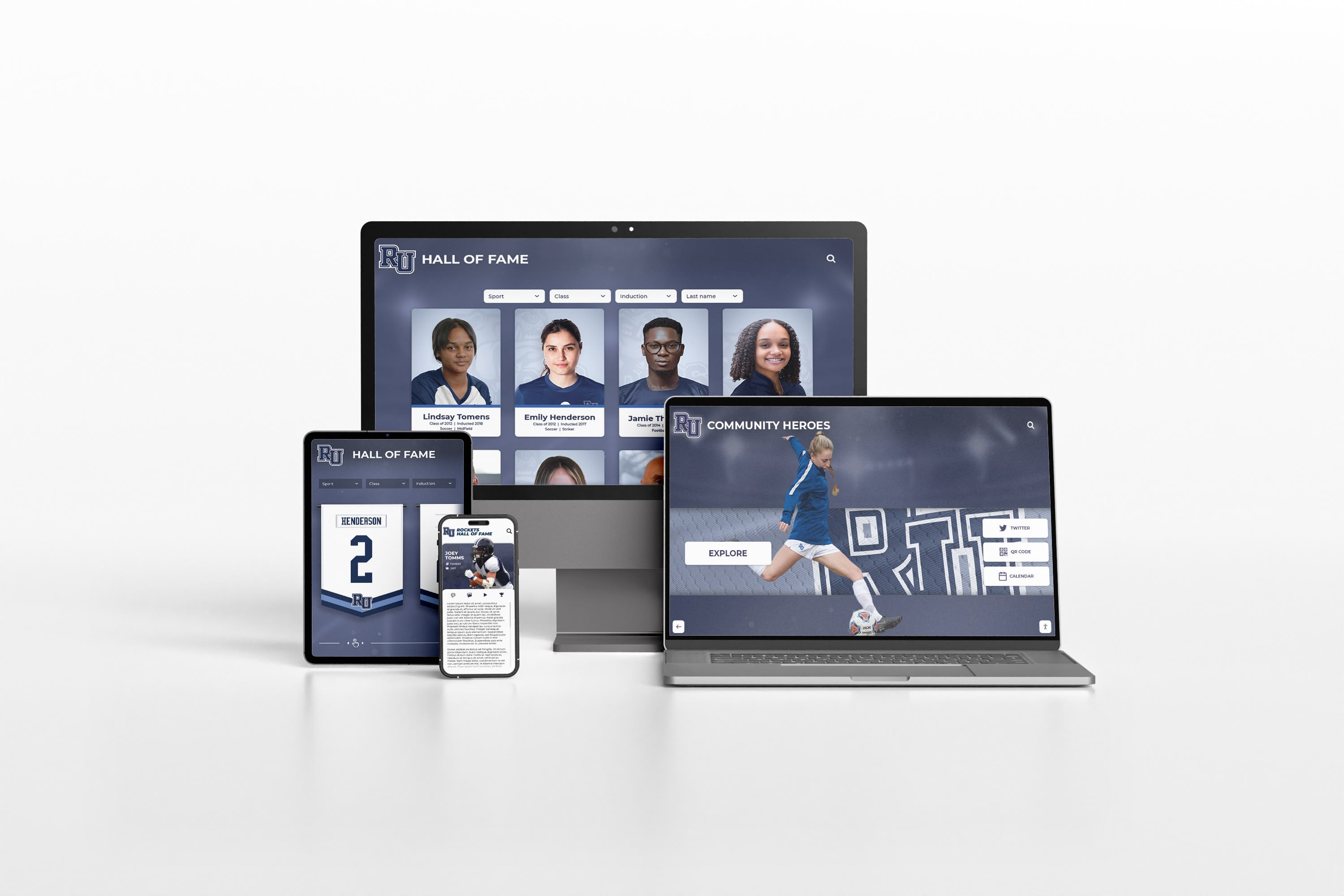
- Responsive design automatically optimizes for touchscreen kiosks, tablets, desktops, and smartphones
- Proven at 1,000+ institutions from small private schools to major universities
Limitations:
Higher initial investment than DIY website approaches. Requires organizational commitment to professional recognition rather than minimal basic lists. Business-hours support only—no 24/7 emergency assistance (typically not needed for recognition displays).
Learn more about how to implement digital wall of fame systems with best practices for successful deployment.
Custom WordPress Development: Maximum Flexibility
Best for: Organizations with dedicated web development resources seeking complete design control and tight integration with existing systems
Total Score: 72/100
Category Scores:
- ADA Compliance: 15/25 (achievable but requires expertise and testing)
- Content Operations: 18/25 (varies by developer; plugin-dependent)
- Hardware Flexibility: 18/20 (can support various hardware with proper development)
- Data Security: 12/15 (depends on hosting, developer implementation)
- Support Quality: 9/15 (self-managed or contracted; no vendor SLA)
Strengths:
Complete design freedom enables exact matching of organizational branding and unique requirements. Extensive plugin ecosystem provides starting points for galleries, forms, search, and media management. Full data ownership and hosting control. Excellent SEO capabilities driving organic discovery. Flexible integration with existing authentication, databases, and campus systems.
Significant challenges:
Accessibility expertise required: Achieving WCAG 2.1 AA compliance demands specialized knowledge most developers lack. Many WordPress themes fail basic accessibility tests requiring extensive remediation. Third-party accessibility audits cost $3,000-$8,000 additional.
Extended timelines: Custom development typically requires 4-8 months from requirements gathering through testing and launch—significantly longer than purpose-built platforms deployed in 2-4 weeks.
Ongoing maintenance burden: WordPress core updates quarterly. Theme and plugin updates occur weekly. Security vulnerabilities require prompt patching. Hosting optimization needed as content grows. Typical annual maintenance costs $5,000-$15,000.
Variable quality: Results depend entirely on developer skill and budget. Low-cost developers often deliver subpar accessibility, security, or performance. Quality development costs $75-$150+ per hour.
Limited touchscreen optimization: Most WordPress themes designed for desktop browsing don’t translate well to touchscreen kiosks. Custom touch-optimized interfaces require additional development investment.
Pricing reality:
- Initial development: $20,000-$75,000 for quality recognition functionality
- Hosting: $1,000-$4,000 annually for robust managed WordPress hosting
- Maintenance: $5,000-$15,000 annually for updates, security, optimization
- Content migration: $3,000-$10,000 for historical data digitization and import
- Accessibility audit: $3,000-$8,000 for third-party WCAG testing
Total 5-year cost: $75,000-$150,000+ depending on complexity and ongoing support needs.
When this makes sense:
Large institutions with dedicated web development teams capable of building and maintaining sophisticated custom platforms. Organizations with complex integration requirements that off-the-shelf platforms cannot accommodate. Districts needing recognition tightly coupled with existing proprietary systems.
Reality check:
Most organizations discover custom WordPress costs 2-3x more and takes 4-6x longer than specialized platforms like Rocket Alumni Solutions while delivering comparable or inferior results. The flexibility advantage matters only when requirements genuinely exceed purpose-built platform capabilities—a rare situation for standard recognition programs.
Consider best school history software options before committing to custom development.
Digital Signage Platforms: Multi-Purpose Communication Tools
Best for: Organizations already using digital signage infrastructure who want to incorporate recognition content alongside other communications
Total Score: 58/100
Representative platforms: ScreenCloud, Rise Vision, OptiSigns, Xibo
Category Scores:
- ADA Compliance: 10/25 (slideshow format limits accessibility features)
- Content Operations: 18/25 (good for signage; poor for database management)
- Hardware Flexibility: 18/20 (generally hardware-agnostic)
- Data Security: 10/15 (varies by platform; less scrutiny than enterprise systems)
- Support Quality: 12/15 (typically available but focused on signage not recognition)
Where digital signage works:
Rotating slideshow presentations of recent inductees, championship celebrations, and achievement highlights. Scheduled content alternating between recognition, announcements, emergency alerts, and promotional materials. Multi-location synchronization displaying same content across multiple campuses. Cost justification across various uses beyond recognition alone.
Critical limitations for comprehensive recognition:
No database functionality: Digital signage platforms display scheduled content but lack searchable achievement archives. Visitors cannot find specific individuals, filter by year, or explore related content—core requirements for effective recognition.
Minimal interactivity: Basic touchscreen support allows changing slides but not sophisticated exploration, search, or discovery features that engaging halls of fame require.
Shallow profile depth: Slideshow format constrains biographical storytelling to brief snippets rather than comprehensive profiles with photos, videos, statistics, and narratives.
Generic templates: Recognition designs not specifically tailored for hall of fame requirements. Creating compelling recognition presentations requires graphic design skills and ongoing effort.
Limited accessibility: Automatic content rotation creates timing challenges for users needing extended viewing. Screen reader support often inadequate for complex recognition content.
Pricing:
Subscription models typically $10-$30 per screen monthly depending on platform and features. Annual costs for 5-screen deployment: $600-$1,800. Additional costs for content creation, hardware, and installation.
Best use case:
Schools already committed to digital signage campus-wide who want to incorporate recognition highlight reels on existing displays. Works reasonably for rotating athlete spotlights and championship celebrations but inadequate for comprehensive, searchable halls of fame requiring database functionality.
Recommendation:
For organizations prioritizing recognition programs, dedicated platforms like Rocket Alumni Solutions deliver dramatically superior hall of fame experiences. Reserve digital signage platforms for supplementary recognition content rotation rather than primary recognition database needs.
Explore touchscreen software comparison for recognition-specific vs. general-purpose options.
Proprietary Vendor Systems: Integrated Hardware/Software
Best for: Organizations valuing single-vendor accountability for complete turnkey solutions
Total Score: 65/100
Representative approach: Some vendors provide proprietary hardware and software as fully integrated packages
Category Scores:
- ADA Compliance: 18/25 (varies by vendor; verify audit documentation)
- Content Operations: 15/25 (often desktop-only CMS; limited remote access)
- Hardware Flexibility: 8/20 (vendor lock-in; limited options)
- Data Security: 13/15 (typically adequate but verify specifics)
- Support Quality: 11/15 (vendor-provided but response times vary)
Advantages:
Single point of contact for both hardware and software support. Complete systems designed to work together. Some organizations appreciate simplified procurement with bundled pricing. Vendor handles installation, configuration, and initial training.
Significant concerns:
Hardware lock-in: Proprietary systems force continued purchases from single vendor at non-competitive pricing. Display upgrades, repairs, and expansions available only through original vendor. Organizations report paying 40-60% premiums versus commercial off-the-shelf displays.
Limited flexibility: Vendor-specific operating systems and software prevent competitive alternatives. Switching platforms later requires replacing entire systems. Organizations effectively locked in for 7-10+ year hardware lifecycles.
Desktop-only management: Many proprietary systems require Windows desktop software for content management—no remote access from home, mobile devices, or cloud interfaces. Updates necessitate physical access to specific computers.
Uncertain longevity: Smaller vendors may be acquired, discontinue products, or exit markets leaving customers stranded with unsupported systems. Due diligence on vendor financial stability critical.
Pricing:
Typically $15,000-$45,000 for initial installation with annual maintenance $1,500-$4,000. Hardware replacement costs every 7-10 years add $5,000-$15,000 per display.
When this makes sense:
Organizations with strong preference for single-vendor accountability. Institutions without IT resources to procure and integrate separate hardware and software components. Situations where vendor provides unique features unavailable elsewhere (rare for standard recognition).
Strategic consideration:
Hardware flexibility matters more than most organizations initially realize. Display technology improves rapidly—4K became standard, 8K emerging, touchscreen sensitivity advancing. Proprietary systems prevent leveraging these advances without complete replacements while flexible platforms like Rocket adopt new hardware seamlessly.

Basic Website Builders: Minimal Investment Approaches
Best for: Organizations with extremely limited budgets needing temporary recognition pages
Total Score: 38/100
Representative platforms: Google Sites, Wix, Squarespace, Weebly
Category Scores:
- ADA Compliance: 8/25 (basic compliance possible; sophisticated features absent)
- Content Operations: 12/25 (simple editing but limited database capabilities)
- Hardware Flexibility: 5/20 (not designed for touchscreen deployment)
- Data Security: 10/15 (platform-dependent; consumer-grade security)
- Support Quality: 3/15 (community forums; minimal direct assistance)
What website builders can accomplish:
Simple recognition pages listing honoree names, years, and basic achievements. Photo galleries displaying achievement images in grid layouts. Embedded videos from YouTube or Vimeo. Forms collecting nomination submissions. Zero software costs for organizations using existing accounts (Google Workspace, etc.).
Substantial limitations:
No database or search functionality: Creating searchable archives with filtering requires custom development beyond basic website builder capabilities. Visitors scroll through long pages unable to efficiently find specific individuals.
Generic appearance: Limited customization options result in unprofessional presentation inappropriate for institutional recognition. Templates designed for generic websites, not specialized recognition requirements.
Poor scalability: Performance and usability degrade significantly with extensive content. Many website builders limit page sizes making comprehensive recognition impractical.
No touchscreen optimization: Interfaces designed for desktop/mobile browsing don’t translate to touchscreen kiosks. Navigation patterns inappropriate for public displays.
Minimal analytics: Basic traffic statistics but no detailed engagement metrics showing which content visitors explore or how they navigate recognition information.
Pricing:
Free (Google Sites with Workspace) to $150-$400 annually (Wix, Squarespace premium plans).
Honest assessment:
Website builders work for simple honor roll pages or temporary recognition listings when absolutely no budget exists. Organizations should view these as placeholder solutions until proper recognition platforms become feasible. The minimal investment saves little while delivering significantly inferior recognition experiences compared to even modest specialized platforms.
Most organizations discover that virtual hall of fame platform investments deliver exponentially better engagement and long-term value than free but severely limited tools.
Decision Framework: Choosing Your Platform
Critical Path Questions
Question 1: Do you need ADA WCAG 2.1 AA compliance?
If your organization is a public educational institution, receives federal funding, or faces accessibility requirements, eliminate any vendor without third-party audit documentation. This immediately narrows viable options to purpose-built platforms like Rocket Alumni Solutions and thoroughly-tested custom development.
Question 2: What content management capabilities does your staff require?
If non-technical staff need to update recognition independently without vendor dependencies or IT assistance, prioritize platforms with intuitive cloud-based CMS interfaces. Desktop-only or complex systems create ongoing bottlenecks and delays.
Question 3: Is hardware flexibility important for your budget?
If controlling ongoing costs and preventing vendor lock-in matters, require platforms supporting commercial off-the-shelf displays from multiple manufacturers. Proprietary hardware locks you into single-source pricing for 7-10+ years.
Question 4: Do you need both physical displays and web accessibility?
If recognition should be available both at physical locations and remotely via web browsers, ensure platforms support unified content management for both interfaces. Managing separate systems doubles administrative burden.
Question 5: What support response times does your organization require?
If displays must remain operational during business hours with rapid issue resolution, verify documented SLA commitments. Email-only support or undefined response times create extended downtime during critical events.
Weighted Comparison Matrix
| Criterion | Weight | Rocket Alumni | WordPress Custom | Digital Signage | Proprietary Vendor | Website Builders |
|---|---|---|---|---|---|---|
| ADA Compliance | 25% | 24/25 | 15/25 | 10/25 | 18/25 | 8/25 |
| Content Operations | 25% | 25/25 | 18/25 | 18/25 | 15/25 | 12/25 |
| Hardware Flexibility | 20% | 20/20 | 18/20 | 18/20 | 8/20 | 5/20 |
| Data Security | 15% | 15/15 | 12/15 | 10/15 | 13/15 | 10/15 |
| Support Quality | 15% | 8/15 | 9/15 | 12/15 | 11/15 | 3/15 |
| Total Score | 100% | 92/100 | 72/100 | 58/100 | 65/100 | 38/100 |
| 5-Year TCO | — | $30K-$60K | $75K-$150K | $15K-$25K | $40K-$80K | $0-$2K |
Implementation Considerations Beyond Platform Selection
Content Development Realities
The most sophisticated platform fails without compelling content. Budget 100-200 hours for initial content development including:
- Historical research gathering achievement records from archives, yearbooks, programs
- Photography coordination securing high-resolution images of honorees and achievements
- Biographical writing creating consistent, engaging 300-500 word profiles
- Data entry organizing information in structured formats for import
- Quality assurance verifying accuracy, consistency, and appropriate tone
Many organizations underestimate content development effort leading to extended implementations and incomplete launches. Consider professional academic history archiving services for efficient historical content digitization.
Hardware Procurement Best Practices
If selecting platforms supporting flexible hardware:
Display specifications for recognition applications:
- Commercial-grade panels rated for 16-24 hour daily operation
- Minimum 1920x1080 resolution; 4K preferred for large displays
- Capacitive touchscreen technology for responsive interaction
- Anti-glare coating for high-ambient-light locations
- VESA mounting compatibility for flexible installation options
Sizing guidance based on viewing distance:
- 43-50" displays: Intimate spaces, 3-6 foot viewing distance
- 55-65" displays: Standard lobbies, 6-10 foot viewing distance
- 75-86" displays: Large gathering spaces, 10-15 foot viewing distance
- 98"+ displays: Arena lobbies, auditoriums, 15+ foot viewing distance
Installation environment factors:
- Network connectivity: Wired Ethernet strongly preferred over WiFi
- Mounting height: Touch controls 15-48 inches for ADA compliance
- Ambient lighting: Consider anti-glare treatments or positioning
- Physical security: Secure mounting to prevent theft or vandalism
Training and Change Management
Technology succeeds or fails based on organizational adoption:
Administrator training components:
- Live hands-on sessions covering core functionality (2-4 hours)
- Documentation and video tutorials for reference
- Practice exercises with test content before production use
- Refresher sessions 60-90 days after launch addressing questions
Stakeholder communication:
- Preview presentations for leadership showing capabilities
- Demonstration sessions for departments contributing content
- Promotional campaigns announcing launch to audiences
- Feedback collection mechanisms for continuous improvement
Explore digital recognition display best practices for successful implementation strategies.
Common Procurement Mistakes to Avoid
Mistake 1: Prioritizing price over total cost of ownership
Selecting the cheapest initial option often leads to hidden costs exceeding premium alternatives. Factor in content management time, technical support needs, accessibility retrofitting, hardware replacement cycles, and eventual platform migration when comparing true long-term costs.
Mistake 2: Skipping reference checks
Always speak with 3-5 current customers at similar organizations before finalizing platform decisions. Sales demonstrations show ideal scenarios while references reveal real-world experiences including support responsiveness, implementation challenges, and long-term satisfaction.
Mistake 3: Ignoring accessibility compliance
Many organizations defer accessibility considerations until later—a costly mistake. Retrofitting compliance costs 3-5x more than selecting compliant platforms initially. Legal exposure from non-compliant systems can reach six figures in settlements and remediation.
Mistake 4: Underestimating staff technical capabilities
Sophisticated platforms requiring extensive technical expertise create ongoing IT dependencies. Honestly assess whether your staff can manage proposed systems independently or if continuous external support will be required—dramatically affecting true operational costs.
Mistake 5: Accepting vague pricing
Demand detailed pricing covering all components: software licensing, hardware costs, installation services, content migration, training, ongoing support, and future upgrade paths. Vague quotes hide expenses revealed only after commitment.
Mistake 6: Overlooking long-term vendor viability
Smaller vendors may be acquired, discontinue products, or exit markets. Research vendor financial stability, customer base size, years in business, and long-term roadmaps. Selecting unstable vendors creates orphaned systems requiring expensive replacement within 3-5 years.
Learn about common mistakes installing hall of fame boards to avoid implementation pitfalls.
RFP Response Requirements: What to Ask Vendors
If issuing formal requests for proposal, require vendors to address:
Technical Specifications
- Detailed accessibility conformance documentation including third-party audit results
- Supported hardware specifications and operating system requirements
- Content management system interface (cloud-based vs. desktop, remote access capability)
- Maximum database capacity (profiles, photos, videos, documents)
- Network requirements (bandwidth, firewall ports, security protocols)
- Offline operation capabilities during network outages
- Mobile responsiveness across device types and screen sizes
Security and Compliance
- Data encryption methods for transmission and storage
- Third-party security audit results and certifications (SOC 2, ISO 27001)
- FERPA compliance documentation for educational institutions
- Backup and disaster recovery procedures with recovery time objectives
- Data ownership terms explicitly stated in contract language
- Geographic data storage locations and compliance with regulations
Implementation and Support
- Documented implementation methodology with timeline estimates
- Content migration services scope and pricing
- Training format, duration, and included participants
- Support channels (phone, email, chat) and availability hours
- Service level agreement (SLA) commitments with response time guarantees
- Escalation procedures for critical issues
- Software update frequency and delivery method
Pricing Transparency
- Itemized initial investment breakdown (software, hardware, services)
- Annual ongoing costs (licensing, support, maintenance) clearly stated
- Price protection commitments limiting future increases
- Volume discounts for multiple displays or multi-year contracts
- Payment terms and milestone schedules
- Total cost of ownership projections for 5-year period
References and Proof Points
- Minimum five customer references at similar organizations
- Case studies demonstrating comparable implementations
- Uptime statistics and reliability metrics
- Average customer tenure demonstrating satisfaction and retention

Why Rocket Alumni Solutions Wins Most Evaluation Scenarios
Based on weighted criteria analysis, Rocket Alumni Solutions emerges as the optimal choice for most organizations because:
Compliance Excellence: Third-party WCAG 2.1 AA audit eliminates accessibility risk that plagues competitors. Organizations face no compliance retrofitting costs or legal exposure from non-compliant systems.
Content Operations Advantage: Cloud-based CMS enables remote updates from any device—home, office, mobile—without desktop software or VPN requirements. Bulk import migrates thousands of historical profiles in hours versus months. Unlimited layouts accommodate diverse recognition types without custom development fees.
Hardware Freedom Prevents Lock-In: Support for any commercial display from multiple manufacturers enables competitive hardware procurement. Organizations leverage existing equipment when suitable or select displays based on their needs rather than vendor restrictions. Future hardware upgrades happen without software replacement.
Auto-Ranking Eliminates Manual Maintenance: Unique automated record board functionality maintains “Top 10” lists across sports as achievements occur. Manual systems require continuous updating—time-consuming and error-prone. Rocket automatically sorts athletes by performance as new records are added.
QR Unlocks Bridge Physical and Digital: Visitors scan QR codes with smartphones to view content on large displays—combining personal device convenience with impressive large-screen presentation. Unique capability absent from competing platforms.
Proven at Scale: 1,000+ installations from small private schools to major universities demonstrate reliability across diverse institutional contexts. Platform maturity evident in comprehensive feature set, polished interfaces, and extensive implementation experience.
Realistic Support Model: Business-hours phone and email support matches recognition display needs—displays don’t require 24/7 emergency support unlike critical business systems. Responsive assistance during normal operational hours at lower cost than enterprise-level SLAs rarely needed for recognition applications.
Discover how touchscreen software from Rocket Alumni Solutions delivers specialized recognition capabilities.
Conclusion: Making Your Platform Decision
Virtual hall of fame platforms determine recognition program success for 7-10+ years. The right platform enables engaging experiences celebrating achievements effectively while manageable administration keeps content current. The wrong platform creates ongoing frustrations, hidden costs, compliance risks, and eventual expensive replacement.
For most evaluation committees, the decision framework simplifies to:
Choose Rocket Alumni Solutions when: You need comprehensive purpose-built recognition with proven technology, manageable administration by non-technical staff, accessibility compliance documented through third-party audits, hardware flexibility preventing vendor lock-in, and turnkey implementation with dedicated support. This represents 80% of educational institutions, athletic departments, and nonprofits implementing virtual halls of fame.
Choose custom WordPress development when: You have dedicated web development resources, unique requirements that purpose-built platforms cannot accommodate, complex integration needs with existing proprietary systems, and budgets of $75,000+ for initial development plus $15,000+ annually for ongoing maintenance. This represents large institutions with established development teams—perhaps 10% of organizations.
Choose digital signage platforms when: Recognition represents supplementary content alongside primary communications needs, slideshow format suffices for achievement highlights without database exploration, and you already maintain digital signage infrastructure for other purposes. This works for perhaps 5% of organizations with modest recognition needs.
Avoid website builders and basic tools unless: Absolutely zero budget exists for professional recognition platforms and you need temporary placeholder solutions until proper investment becomes available. This represents 5% of organizations in temporary holding patterns.
The structured comparison, weighted scoring, and deal-breaker checklists in this guide provide the framework for confident platform evaluation. Request demonstrations addressing your specific requirements. Speak with references at similar organizations. Review accessibility documentation and security certifications. Understand total cost of ownership beyond initial pricing.
Your organization’s achievements deserve recognition technology specifically designed to celebrate excellence professionally. The platform you select determines whether recognition inspires, engages, and honors effectively—or creates frustrations undermining program goals.
Ready to Request Your Custom Comparison Demo?
Visit Rocket Alumni Solutions to see the winning platform in action with your content and requirements. Explore additional resources on how to design stunning digital hall of fame displays, learn about interactive touchscreen display solutions, and discover best practices for digital recognition programs.
Contact evaluation specialists today to discuss your requirements and receive personalized platform recommendations backed by proven implementations at organizations like yours. Book the winning demo and start building recognition programs that celebrate excellence for generations to come.
Disclaimer: This comparison is based on publicly available information as of November 2025. All product names and trademarks belong to their respective owners. Comparative statements reflect Rocket Alumni Solutions’ interpretation of available data and may change over time. This content was produced by or on behalf of Rocket Alumni Solutions.
































